
TL;DR
- Forza Horizon 5 releases on PS5 April 29 at 12:01 AM local time worldwide
- Preloading available immediately with 132GB base game and 157GB premium edition
- Use PlayStation Store countdown timer for precise regional timing accuracy
- Plan storage space and download timing to ensure immediate play access
- Premium edition includes Hot Wheels and Rally Adventure expansion content
Master the vibrant roads of Mexico on your PlayStation 5
After years of Xbox and PC exclusivity since its 2021 debut, Forza Horizon 5 makes its highly anticipated PlayStation 5 debut on Tuesday, April 29. This marks a significant platform expansion for one of racing gaming’s most celebrated titles, bringing the full open-world driving experience to Sony’s console ecosystem.
PlayStation 5 owners can now experience the breathtaking diversity of Mexico’s landscapes, from dense jungles to sun-drenched beaches and bustling towns, all accessible through an extensive garage featuring hundreds of meticulously detailed vehicles. The Horizon Festival provides endless competitive opportunities, allowing drivers to test their skills across varied terrain types and racing disciplines against global competitors. While the wait has been substantial since the original 2021 launch, the complete feature set ensures PS5 players receive the definitive Forza Horizon 5 experience.

Here’s precisely when Forza Horizon 5 becomes available on PS5
The global release follows a local time strategy, with Forza Horizon 5 unlocking at 12:01 a.m. local time on Tuesday, April 29 regardless of your geographical location. PlayStation Network’s dynamic countdown system provides real-time tracking on the official Forza Horizon 5 store page, though players should verify they’re viewing their correct regional storefront for accurate timing information.
North American racers receive synchronized nationwide availability at 12:01 a.m. EDT on Tuesday, April 29, with corresponding timezone adjustments:
- 9:01 p.m. PDT for the West Coast of the U.S. and Canada
- 11:01 p.m. CDT for central U.S. and Canada
- 12:01 a.m. EDT for the East Coast of the U.S. and Canada
Pro Tip: Set calendar reminders for your specific timezone and ensure your PS5 rest mode settings allow automatic downloads to begin playing immediately at launch.
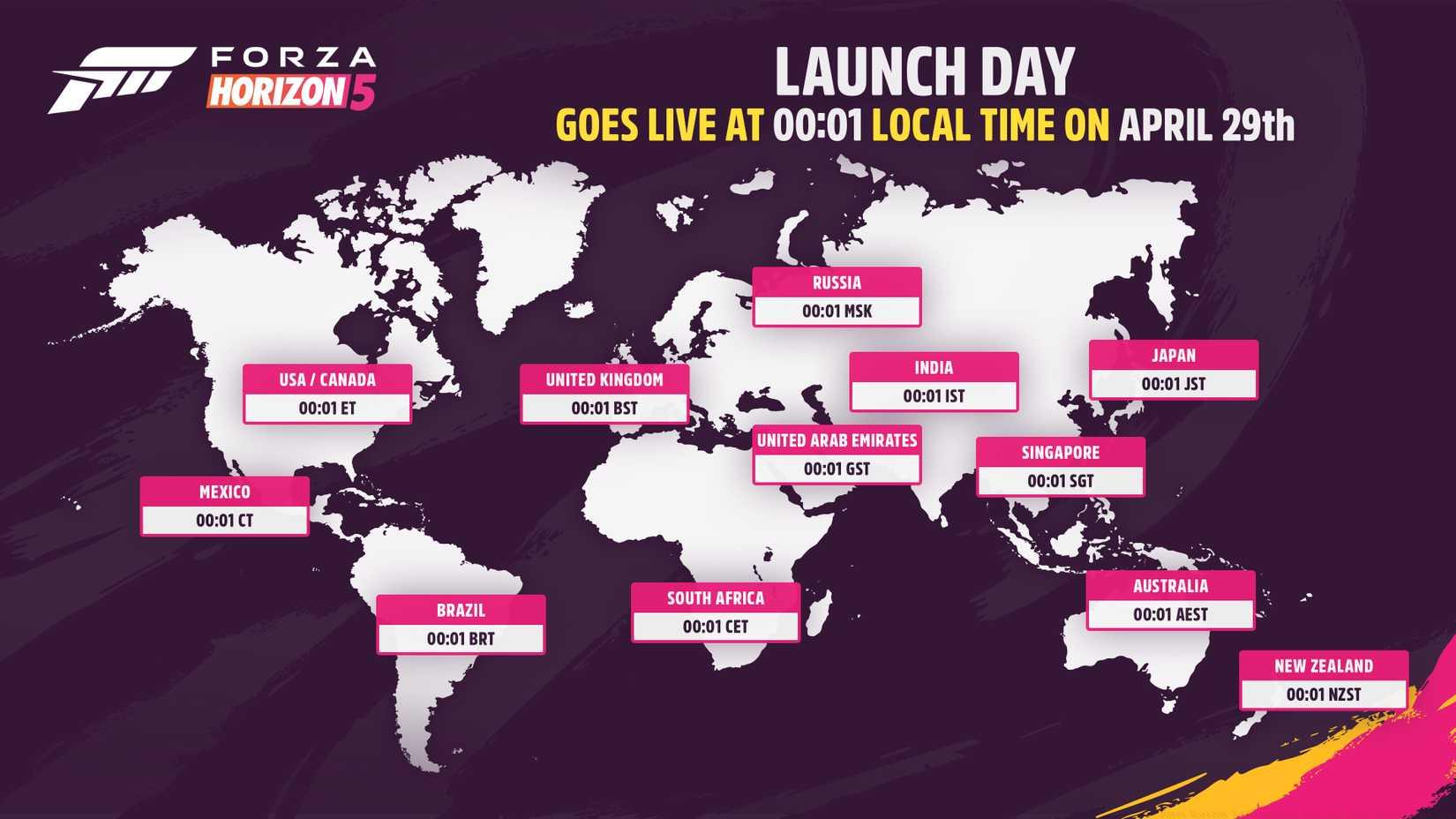
Image: Playground Games/Xbox Game Studios
Preloading is immediately available for Forza Horizon 5 on PlayStation 5, allowing players to download the entire game before the official launch. The standard edition requires approximately 132 GB of available storage space, while the premium edition expands to around 157 GB due to the inclusion of both Hot Wheels and Rally Adventure expansion content.
Storage Management Strategy: With PS5 solid-state drive space at a premium, consider installing an compatible NVMe SSD expansion drive if your storage is nearly full. The premium edition’s additional 25GB requirement means planning ahead is crucial for players with limited available space.
Installation Best Practices: Begin your download during off-peak hours (typically late evening or early morning) for potentially faster speeds. Ensure your console remains in rest mode with network connectivity enabled to complete the download without interruption. Verify the installation completes fully before the release time to avoid last-minute technical issues.
Advanced Preparation Strategies: Beyond basic preloading, several optimization techniques can enhance your launch day experience. Clear unnecessary game data and captures to ensure sufficient operating space beyond the installation requirements—we recommend maintaining at least 50GB free space post-installation for optimal performance.
Network Optimization: For players with data caps or slower connections, schedule your download during unlimited data periods if available. Wired Ethernet connections typically provide more stable download speeds than Wi-Fi, crucial for the large file size. Consider pausing other downloads or streaming during the Forza Horizon 5 installation to maximize bandwidth allocation.
Game Setup Preparation: Familiarize yourself with control customization options beforehand through our control scheme guides to minimize configuration time at launch. Understanding the various driving assists and difficulty settings from our gameplay customization resources will help you jump directly into racing rather than navigating menus.
For comprehensive racing game strategies and advanced techniques, explore our complete racing game mastery guide to enhance your skills across multiple titles and genres.
Action Checklist
- Verify available storage space (132GB standard/157GB premium)
- Initiate preload download via PlayStation Store
- Check regional countdown timer for precise unlock time
- Configure PS5 rest mode for automatic updates
- Review control schemes and driving assists beforehand
No reproduction without permission:Game Guides » Forza Horizon 5 PS5 release time and date in your time zone Complete guide to Forza Horizon 5 PS5 release timing, preloading, and essential preparation strategies