
TL;DR
- CS2’s April 25 update introduced a specialized reticle for precise grenade lineups
- The reticle activates after pulling the pin and provides enhanced aiming points
- Customizable timing from 0-5 seconds allows adaptation to different playstyles
- Advanced players can disable the feature or maintain regular crosshair overlay
- Proper reticle usage significantly improves grenade accuracy and execution speed
Games and Esports Articles CS 2
The groundbreaking April 25 CS2 update introduced an innovative targeting reticle specifically designed for grenade lineups. This sophisticated visual aid enables players to significantly reduce their dependency on environmental landmarks when executing precise throws. The system proves particularly valuable when targeting skyboxes or uniform surfaces where traditional reference points are unavailable.
Competitive players will immediately recognize the strategic advantage this provides. Unlike standard crosshairs, the grenade reticle incorporates multiple reference points that align with your throw trajectory, creating a comprehensive aiming framework. This eliminates the guesswork involved in complex grenade placements and dramatically improves first-attempt success rates.
The grenade reticle functions as an advanced targeting overlay that extends beyond your standard crosshair. Activation occurs automatically once you pull the pin from your grenade, with the default configuration displaying the specialized reticle after a brief two-second delay. This timing provides adequate preparation while maintaining gameplay fluidity.
What makes this system particularly effective is its multi-point alignment structure. The reticle displays additional reference markers that help you synchronize your throw angle with environmental features. This proves invaluable for executing smoke screens, flashbang placements, and molotov positions with pixel-perfect precision.
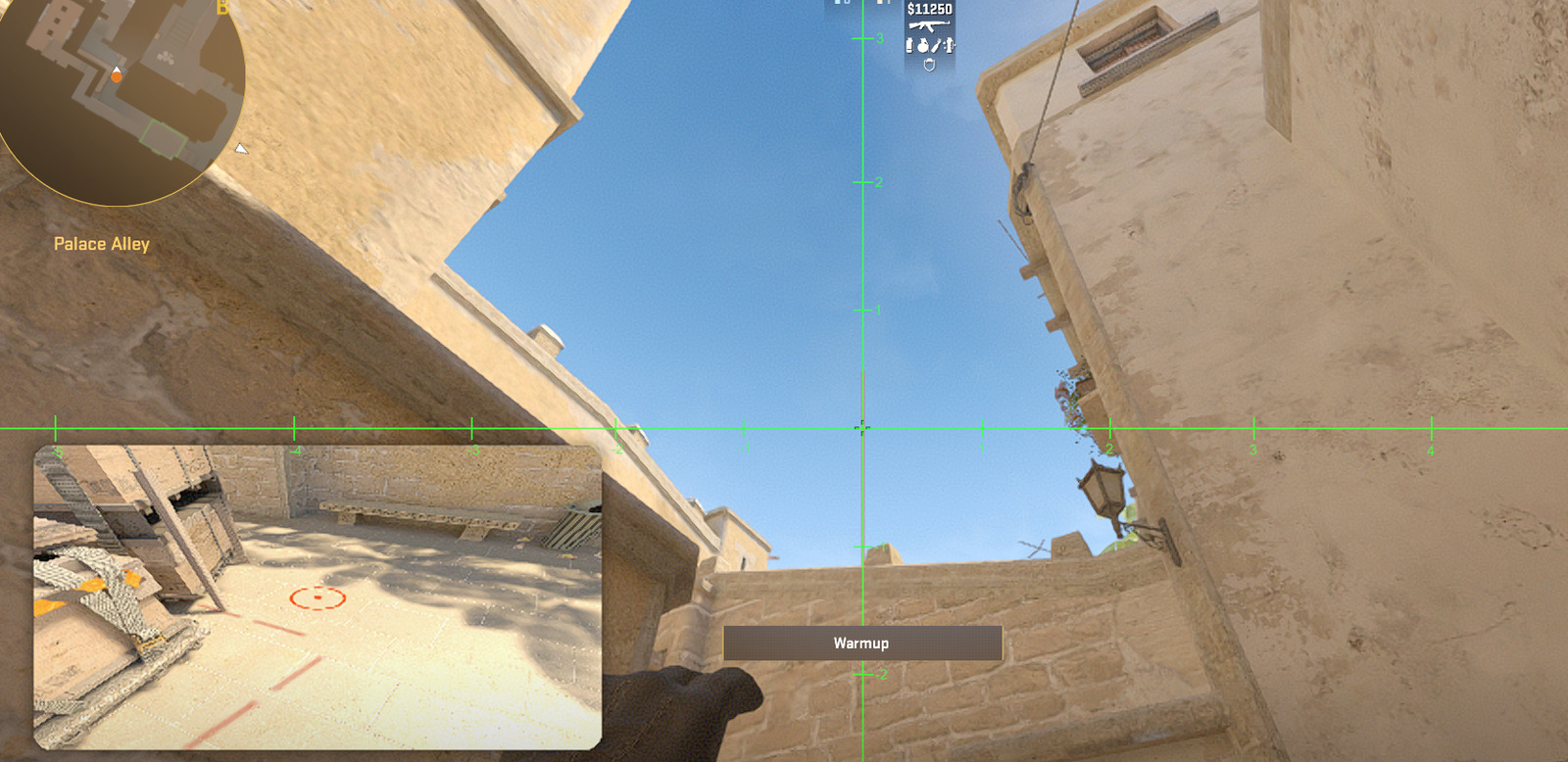
Professional players have quickly adopted this feature for its consistency advantages. Unlike traditional lineup methods that require memorizing specific pixel alignments, the reticle provides immediate visual feedback, reducing the cognitive load during high-pressure situations. This allows for more creative grenade usage and faster adaptation to evolving round dynamics.
Following pin removal, the standard two-second delay before reticle appearance may not suit aggressive, fast-paced strategies. Fortunately, CS2 provides comprehensive customization options for this feature. Navigate to Settings > Game tab and locate the “Grenade Line-up Reticle” configuration panel.
Here you can fine-tune the activation timing for each grenade type individually, with adjustment ranges from instantaneous display up to five-second delays. Complete deactivation remains available through the checkboxes adjacent to each grenade category. The “Keep Regular Crosshair” toggle permits simultaneous visibility of your primary crosshair superimposed over the grenade reticle.
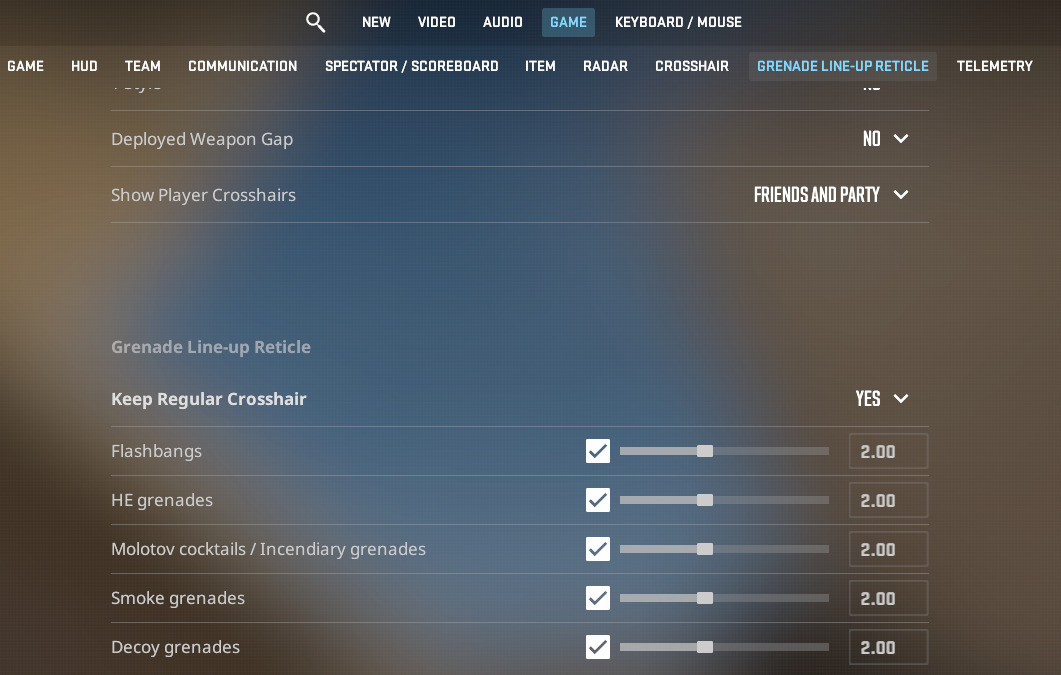
Strategic customization depends heavily on your role and playstyle. Entry frakkers typically prefer faster reticle activation (0.5-1 second) for rapid executes, while support players often opt for longer delays to ensure perfect alignment. Experimentation during practice sessions helps determine your optimal configuration.
Advanced tip: Consider creating different profiles for various maps, as grenade lineups require different timing considerations based on common execute positions and defensive setups.
Mastering the grenade reticle system requires understanding both its capabilities and limitations. While the tool significantly improves accuracy, over-reliance can develop bad habits. Always maintain fundamental grenade skills as backup for situations where the reticle might not appear due to gameplay bugs or custom server configurations.
Common mistakes include attempting lineups while moving (which reduces accuracy), failing to account for enemy positioning that might require last-second adjustments, and using the reticle as a crutch rather than an enhancement to existing skills.
For players looking to expand their tactical knowledge beyond grenades, our Complete Guide offers comprehensive strategic frameworks applicable across multiple FPS titles.
Integration with broader gameplay systems proves crucial. The reticle works seamlessly with CS2’s updated Weapons Unlock systems, allowing for integrated tactical approaches. Similarly, understanding how grenade usage complements different Class Guide roles enhances team coordination and round execution.
Practice regimen recommendation: Dedicate 15 minutes daily to grenade practice using the reticle system, focusing on 3-5 key lineups for your most played maps. This builds muscle memory while leveraging the visual aid for consistency.
Action Checklist
- Access Game Settings > Grenade Line-up Reticle section
- Test default reticle timing in a practice server
- Customize activation delays for each grenade type based on playstyle
- Practice 3 essential lineups on your main competitive maps
- Experiment with regular crosshair overlay option for reference point maintenance
- Integrate reticle usage into your team’s execute strategies
No reproduction without permission:Game Guides » Guide on new CS2 grenade lineup reticle. How to set nade crosshair pop-up time in CS2 Master CS2's new grenade reticle system with advanced lineup techniques and customization options