
TL;DR
- Create multiplayer servers by enabling the multiplayer option in world settings during world creation
- Fix ‘Failed to Host Multiplayer Session’ errors through repeated connection attempts or game restarts
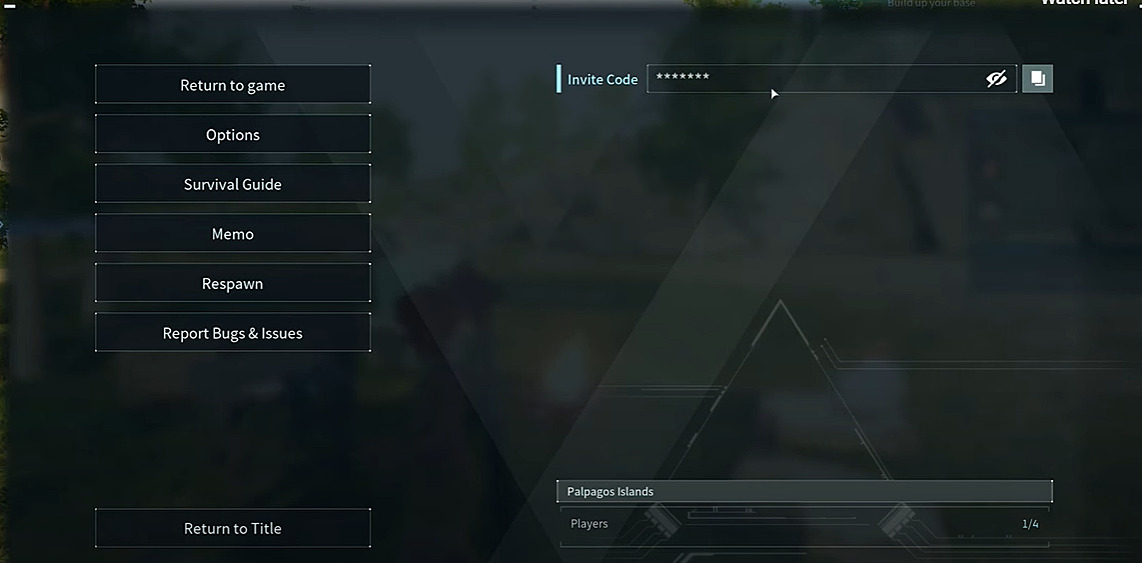
- Find invite codes in-game by pressing Esc and revealing the hidden code on the right panel
- Join friends’ servers using the ‘Join Multiplayer Game (Invite Code)’ option in the main menu
- Optimize server performance by understanding common pitfalls and connection timing strategies
Games and Esports Articles
Palworld delivers thrilling cooperative adventures where you can team up with friends to explore, build, and battle together. The game supports robust multiplayer functionality accommodating up to 32 players on a single server, creating expansive shared worlds for collective gameplay. This comprehensive guide walks you through establishing cooperative sessions and resolving the persistent hosting error that sometimes disrupts multiplayer experiences in Palworld.

Launching your cooperative adventure begins from the main menu interface. Navigate to the Start Game option, then proceed to Create New World where you’ll assign a distinctive name to your server. By default, Palworld disables multiplayer functionality for security and performance reasons. Access the Change World Settings menu to toggle the multiplayer switch to ON, then finalize with OK and Confirm selections.
Pro Tip: Choose your server name carefully as it becomes the primary identifier for friends locating your world. Avoid generic names that might confuse players when multiple servers appear in the list.
Strogest Pals in Palworld. Where to find Anubis, Loupmoon, Lovander, Alpha Mammorest
This connectivity issue primarily stems from Palworld’s explosive popularity overwhelming server infrastructure. Even seasoned developers frequently encounter capacity challenges when player numbers exceed initial projections dramatically. The error typically indicates temporary server saturation rather than configuration problems on your end.
One reliable solution involves persistent connection attempts. When world creation fails, simply click Confirm repeatedly during the setup process. Continue retrying until successful connection establishment occurs. Some players find that completely restarting the game application resolves stubborn connection issues, as this clears temporary network caches and resets connection states.
Advanced Strategy: Attempt server creation during off-peak hours (early morning or late evening) when player traffic decreases significantly, improving success rates substantially.
How to catch Pals in Palworld? Guide to Pal hunting, tips and tricks
To extend invitations to friends for your Palworld server, you’ll need to distribute your unique invitation code. This alphanumeric identifier only becomes visible after successfully creating a world and entering the server environment. Press the Esc key to access the menu system, where on the right-side panel you’ll discover the code concealed behind asterisk characters. Click the eye icon with a slash through it to reveal the actual code, or utilize the copy function for easy sharing.
Friends must input this specific code through the main menu interface. Select the Join Multiplayer Game (Invite Code) option and insert the code sequence into the provided input field. For comprehensive multiplayer strategies, consult our Complete Guide to enhance your cooperative gameplay experience.
Connection Best Practice: Ensure all players have updated to the same game version, as version mismatches represent a common but easily overlooked connection barrier.
Action Checklist
- Create new world and enable multiplayer in settings
- Retrieve invite code from Esc menu and share with friends
- Troubleshoot connection errors with repeated attempts
- Verify game version compatibility across all players
- Optimize connection timing during off-peak hours
No reproduction without permission:Game Guides » How to create Palworld server with friends and where to get invite code to join. How to fix Failed to Host Multiplayer Session error Complete guide to creating Palworld multiplayer servers, fixing connection errors, and sharing invite codes with friends