
TL;DR
- Only PC players can delete custom spells using console commands
- The process requires generating a spell list file and using specific IDs
- Achievements are disabled when using console commands
- Always backup saves before attempting spell removal
- Default game spells remain unaffected by this process
Games and Esports Articles
Custom spell creation represents one of Oblivion Remastered’s most engaging features, allowing players to craft magical effects tailored to their playstyle. However, this powerful tool introduces significant organizational challenges as your collection expands. Each experimental spell or outdated creation accumulates in your spellbook, creating navigation difficulties during combat situations where quick access matters most.
Platform limitations create distinct experiences for different players. Console users currently lack any built-in mechanism for spell removal, forcing them to live with their magical decisions permanently. PC gamers benefit from developer console access, though this solution carries the trade-off of disabling achievement tracking during the process. Understanding these constraints helps set realistic expectations for spell management across platforms.
The PC version provides a technical workaround through developer console commands, though it requires careful execution. This method involves generating a comprehensive spell list file, identifying specific spell IDs, and executing removal commands precisely. While not the most intuitive process, it remains the only verified method for decluttering your magical arsenal.
- Launch Oblivion Remastered and activate the developer console by pressing the tilde (~) key, typically located near your keyboard’s number row.
- Enter the command: save spellclean 1. This generates a text document containing your complete spell inventory within the game’s installation directory.
- Navigate to OblivionRemasteredBinariesWin64 on standard installations. Game Pass users should check XboxGamesThe Elder Scrolls IV- Oblivion RemasteredContentOblivionRemasteredBinariesWinGDK instead.
- Locate the newly created spellclean text file and search for the “Total SPEL” marker. Your custom-created spells appear in the lines preceding this identifier, formatted with specific coding.
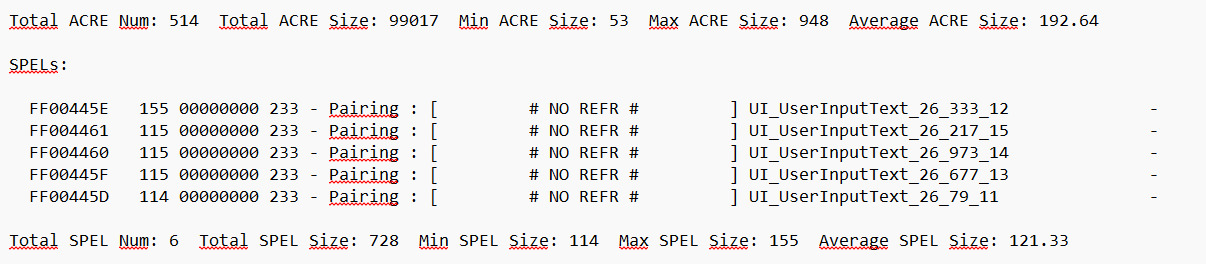
- The hexadecimal code beginning with FF prefixes each custom spell entry, serving as the unique identifier required for removal commands.
- Return to the game and execute: player.removespell FFXXXX (replacing FFXXXX with your actual spell ID).
- Successful removal triggers the confirmation message: “Spell UI_UserInputText was removed from…” indicating the spell has been successfully deleted.
- Open the text file again, delete the corresponding spell entry line, then reload your game save to finalize the changes.
- Important safety note: This procedure exclusively affects player-created spells. All default and quest-acquired spells remain completely secure throughout the process.
Effective spell management extends beyond simple deletion. Consider implementing organizational strategies before creating new spells, such as developing naming conventions that include effect types and power levels. This proactive approach minimizes future clutter and makes identification significantly easier when review becomes necessary.
Common mistakes include attempting to remove spells while they’re actively equipped or failing to properly identify the correct hexadecimal codes. Always verify spell IDs by cross-referencing the in-game spellbook with your generated list to ensure accurate targeting. Creating backup saves before beginning the deletion process provides essential insurance against accidental removal of valuable spells.
For players seeking alternative approaches, consider utilizing mod management tools if available, though these may carry similar achievement-disabling consequences. The Class Guide demonstrates similar organizational principles that can be adapted for spell management. Understanding that custom spells cannot be permanently deleted on console platforms may influence your creation decisions from the beginning.
Time investment for this process typically ranges from 10-20 minutes depending on your spellbook size and familiarity with the game’s file structure. The Complete Guide offers additional gaming optimization strategies that complement this spell management approach.
Action Checklist
- Create backup save file before beginning process
- Generate spell list using ‘save spellclean 1’ command
- Locate and review spellclean file in game directory
- Identify correct FF-prefixed spell IDs for removal
- Execute removal commands and verify success messages
No reproduction without permission:Game Guides » How to delete spells in Oblivion Remastered. How to remove created spells from spellbook Master spell management in Oblivion Remastered with this comprehensive guide to deleting custom spells and optimizing your spellbook