
TL;DR
- Quick items require belt and pouch equipment with up to four slots available
- PC users must hold keys 5-8 while console players use D-pad navigation
- Each outfit configuration needs separate quick item setup for consistent access
- Activation requires holding the key until the progress bar completes fully
- Always verify quick slot visibility using the B key before entering combat
Games and Esports Articles
During intense combat encounters in Kingdom Come: Deliverance 2, your character Henry faces significant inventory access limitations that can leave you vulnerable. However, the developers implemented a crucial exception through the quick item interface, which remains accessible even when swords are drawn and arrows are flying. This system, while potentially lifesaving, presents interface challenges particularly for PC gamers who must navigate non-intuitive key bindings. Understanding these mechanics separates successful medieval warriors from those who perish needlessly.
The quick item menu represents your only lifeline during battle sequences, allowing immediate access to healing potions, buffs, and sustenance when you cannot pause to rummage through your inventory. Many players overlook this feature initially, leading to frustrating deaths that could have been prevented with proper preparation. We’ll break down every aspect to ensure you’re never caught unprepared in the heat of combat.
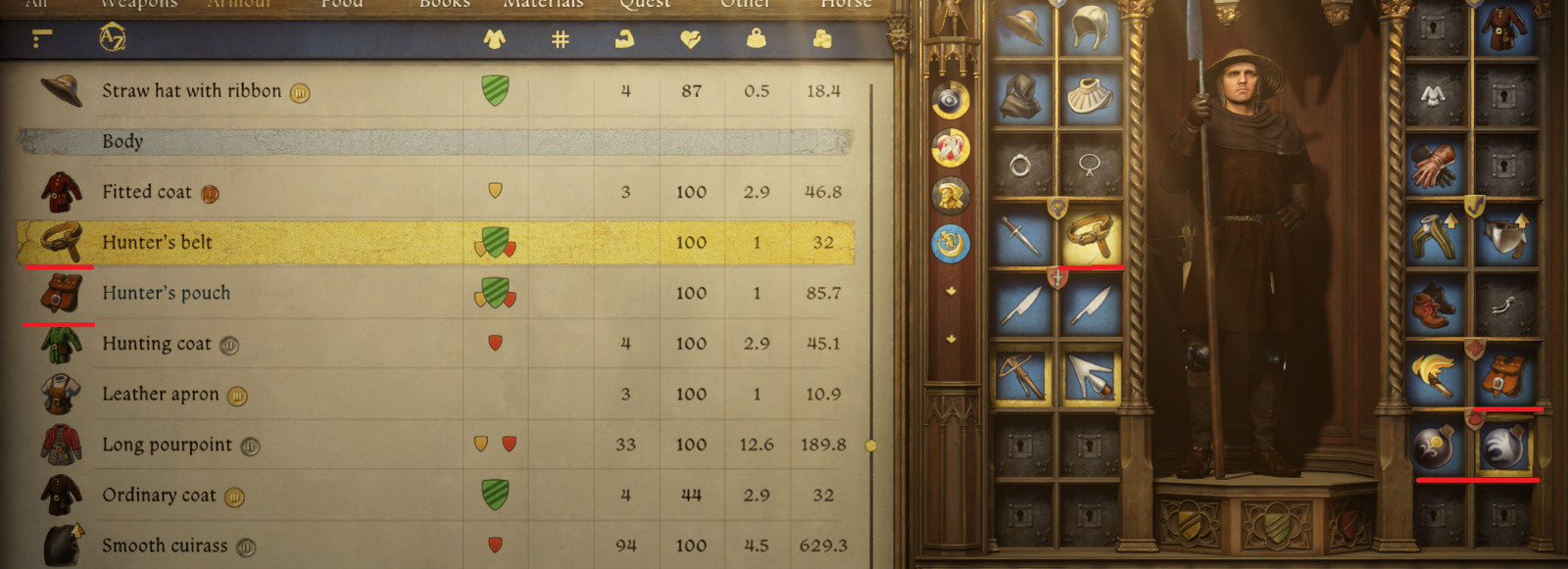
Before you can assign any consumables to your quick access slots, several essential prerequisites must be met. You need a belt and a pouch as these items provide the physical storage capacity for your emergency supplies. Different belt types offer varying pouch attachment points, while pouches themselves come in multiple capacity configurations ranging from basic two-slot versions to premium four-slot containers. Strategic pouch selection becomes critical for players who rely heavily on potions during extended engagements.
Once properly equipped with both belt and pouch, you can assign potions, food, and other consumables to the dedicated slots visible beneath your pouch interface. A common oversight involves forgetting that each outfit configuration requires independent quick item assignment. If you switch between armor sets for different situations—stealth infiltration versus full combat readiness—you must configure quick slots separately for each loadout to avoid being caught without vital consumables.
How to save different outfits in KCD2. How to quickly switch between armor and stealthy clothes in Kingdom Come: Deliverance 2
PC players activate their quick items using the numeric keys 5 through 8 by default, but understanding the activation mechanics proves crucial for successful implementation. Unlike weapon quick slots that respond to single key presses, consumable activation requires sustained key pressure. You’ll observe a gradually decreasing progress bar overlay on the consumable slot icon during activation. The item effect only triggers once this visual indicator completes its full cycle, requiring you to maintain the key press throughout the duration.

You can consistently monitor your configured quick slots by pressing the B key or any of the 5-8 numeric keys. The control scheme remains fully customizable through the game’s settings menu if you prefer alternative key bindings. When quick items appear non-functional despite proper assignment, the most frequent culprit involves items being equipped to a different outfit configuration than the one currently worn. This outfit-specific assignment catches many veteran players off guard during critical moments.
Advanced PC users should practice quick item activation during non-combat situations to develop muscle memory. The timing requirement means you cannot simply tap keys rapidly during combat—proper positioning and timing become as important as swordplay itself. Consider binding your most critical healing potions to the most accessible keys based on your hand positioning during intense gameplay moments.
Console gamers typically find the quick item interface more intuitively designed for controller navigation. The selection process differs significantly from the PC implementation, utilizing directional pad navigation rather than direct key assignment. To choose your desired consumable, navigate through available options using the D-pad, then confirm selection with the X button on PlayStation 5 or A button on Xbox controllers.
This controller-friendly approach eliminates the keyboard memorization requirements but introduces its own strategic considerations. Console players must factor in the additional time required for D-pad navigation during combat, making pre-combat preparation even more critical. The confirmation requirement adds an extra step but prevents accidental consumable activation during frantic combat situations.
How to steal and tame horses in KCD2. All issues with trader Mikolai and selling stolen horses
For optimal console performance, position your most frequently used items in easily accessible D-pad locations. Many experienced players recommend placing healing potions in the first slot position to minimize navigation time during emergency situations. The tactile feedback of controller buttons can actually provide advantages in timing your consumable usage during the chaos of medieval warfare.
Action Checklist
- Acquire and equip both belt and pouch from merchants or loot
- Assign critical potions to quick slots for each outfit configuration
- Practice quick item activation timing in safe environments
- Verify quick slot visibility using B key before entering combat zones
- Customize key bindings or controller layout for personal optimization
No reproduction without permission:Game Guides » How to drink potions in combat in Kingdom Come 2. Which keys use quick items and consumable slots Master Kingdom Come 2's quick item system with essential combat potion strategies and troubleshooting tips