
TL;DR
- PoE 2 requires external tools for price checking since the auction house is website-only
- PoE Overlay II provides real-time pricing data without leaving the game interface
- Weapon evaluation requires strategic affix selection rather than checking all modifiers
- Proper overlay configuration prevents market misinformation and pricing errors
- Advanced filtering techniques significantly improve trade efficiency and profit margins
Games and Esports Articles
Path of Exile 2 transforms player trading into a dynamic marketplace where accurate price assessment becomes your most valuable skill. Unlike traditional MMOs with integrated auction houses, PoE 2’s trading occurs primarily through external platforms, creating both challenges and opportunities for savvy traders.
The absence of an in-game auction house means you’ll conduct market research through third-party websites and tools. This decentralized approach rewards players who master price evaluation techniques, as mispriced items can cost you significant currency or missed profit opportunities. Seasoned traders often spend hours analyzing market trends before major purchases or sales.
Market volatility in PoE 2 follows predictable patterns based on league progression. Early league phases see currency items at premium values, while late-game focuses shift toward high-tier equipment and rare crafting materials. Understanding these market cycles helps you time your trades for maximum returns.
To bridge the gap between game and marketplace, PoE Overlay II emerges as the essential tool for modern Path of Exile 2 traders. Built on the Overwolf platform, this overlay seamlessly integrates price checking into your gameplay experience, eliminating the need for constant alt-tabbing between game and browser.
Begin by downloading the overlay from the official Overwolf app store. The installation process is straightforward but requires granting necessary permissions for the overlay to access game data. Security-conscious players should verify they’re downloading from the official source to avoid compromised versions.
Configuration represents the most critical step for accurate pricing data. Navigate to the settings menu and assign your preferred evaluation hotkey. While ALT+E serves as the default combination, experienced users often customize this to avoid conflicts with other game keybinds or macros they regularly use.
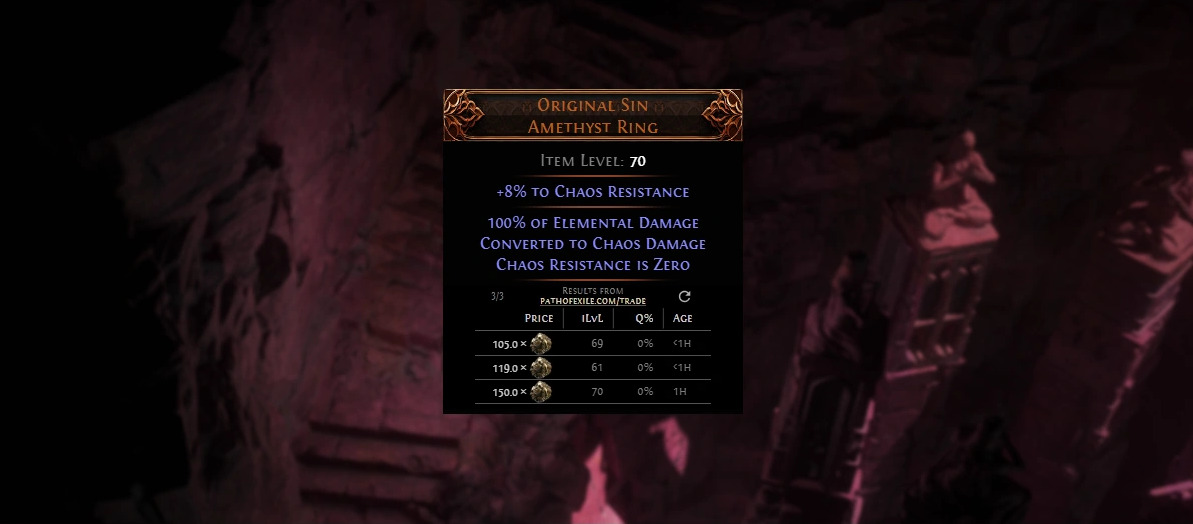
Proper setup ensures the overlay captures item data accurately. Test functionality immediately after configuration by checking common currency items like Chaos Orbs or Divine Orbs to verify price accuracy against known market values.
Mastering price evaluation requires understanding how different item categories demand distinct assessment approaches. Currency items like Exalted Orbs represent the simplest case – hover over the item, press your evaluation key, and select Search to instantly view current seller listings and pricing trends.
Weapon and equipment evaluation introduces complexity that separates novice traders from experts. The overlay presents a menu where you selectively choose two or three primary affixes rather than attempting to evaluate every modifier. This strategic selection dramatically increases match accuracy since searching for overly specific combinations often returns zero results.
Critical mistake to avoid: Selecting more than three affixes typically reduces match probability by over 70%. Focus instead on the most valuable stats for your build archetype – damage modifiers for attack builds, spell damage for casters, and defensive layers for tanks. This focused approach yields more relevant and actionable pricing data.
Advanced traders employ additional filtering techniques like setting price ranges, excluding offline players, or filtering by item level. These techniques help identify true market value rather than outlier prices that skew perception.
How to trade with other players in Path of Exile 2. Where’s auction house and how to sell items in PoE 2
For rare and unique items, cross-reference multiple data sources. Check recent sale histories rather than relying solely on current listings, as unsold items at inflated prices don’t reflect actual market value. This due diligence prevents both underselling valuable finds and overpaying for mediocre gear.
Action Checklist
- Download and install PoE Overlay II from official Overwolf sources
- Configure evaluation hotkey in overlay settings (default: ALT+E)
- Practice currency item evaluation with common orbs to verify accuracy
- Master weapon pricing by selecting only 2-3 key affixes
- Implement advanced filters to exclude outliers and offline players
No reproduction without permission:Game Guides » How to easy check prices for trade in PoE 2. How to evaluate items with overlay in Path of Exile 2 Master PoE 2 trading with expert price checking techniques and overlay tools for maximum profit