
TL;DR
- Delete shaders folder to force regeneration and fix 20% FPS drops
- Update graphics drivers and verify game files for additional performance gains
- Patch 1.2 introduced major gameplay improvements alongside performance changes
- Monitor system temperatures and adjust settings for optimal performance
- Use multiple verification methods to ensure complete issue resolution
Games and Esports Articles
The substantial Kingdom Come: Deliverance 2 update 1.2 delivered numerous performance enhancements but inadvertently created optimization conflicts for certain hardware configurations. Many gamers report experiencing substantial frame rate reductions approaching 20% following the installation. If you’re encountering similar performance degradation, this comprehensive troubleshooting approach provides reliable solutions.
Performance analysis indicates the primary culprit involves corrupted or outdated shader cache files that conflict with the new rendering optimizations. The game’s engine attempts to utilize existing cached data that’s no longer compatible with the updated graphical systems, resulting in significant frame time inconsistencies and overall performance regression.
Community-driven solutions from gaming forums and Reddit discussions confirm this technique effectively resolves the majority of FPS instability cases. The procedure involves several straightforward system-level operations:
- Ensure complete game closure through Task Manager to verify no background processes remain active.
- Navigate to the saved games directory at C:UsersYOURNAMESaved Gameskingdomcome2
- Locate and permanently remove the shaders subfolder containing the problematic cache data.
- Restart the game application, allowing the engine to reconstruct optimized shaders specifically for your hardware configuration.
This forced shader regeneration process typically adds 2-5 minutes to initial loading times as the game rebuilds necessary graphical components, but delivers substantially improved frame rate consistency throughout extended gameplay sessions.
For persistent performance challenges following the primary solution, implement these additional optimization strategies. Begin with updating your graphics drivers to the latest stable version, as new driver optimizations frequently include game-specific performance enhancements. NVIDIA and AMD typically release updated drivers coinciding with major game patches.
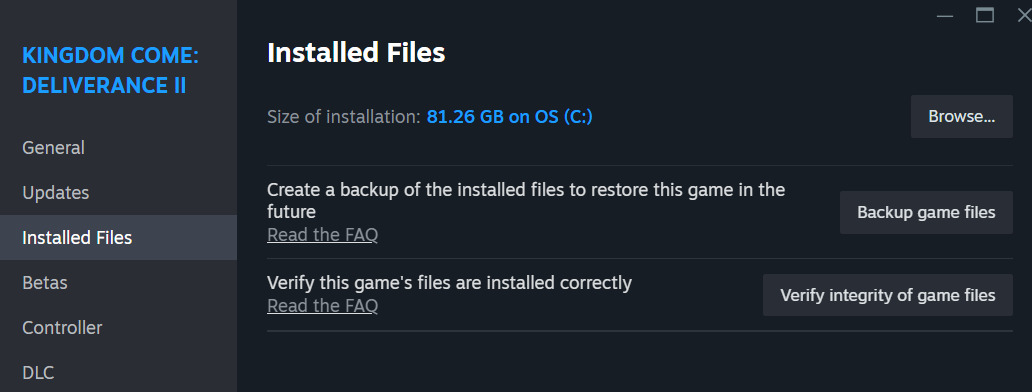
Concurrently, verify the integrity of your game installation files through Steam’s validation system. Access this by right-clicking Kingdom Come: Deliverance 2 in your Steam Library, selecting Properties, navigating to Installed Files, and initiating the verification process. This identifies and replaces any corrupted game assets that might contribute to performance issues.
Advanced users should monitor system temperatures during gameplay, as thermal throttling can mimic patch-related performance issues. Consider adjusting in-game graphical settings, particularly shadow quality and draw distance, which disproportionately impact performance in open-world environments. For comprehensive weapon and gameplay strategies, consult our Weapons Unlock guide for additional optimization insights.
The substantial March 13 update introduced transformative gameplay elements alongside performance modifications. Developers integrated character customization through barber services for altering Henry’s appearance and implemented foundational mod support infrastructure. The comprehensive rebalancing affected nearly all core game systems, with particularly significant adjustments to Crime mechanics, combat balancing, and stealth systems.
These extensive modifications, while improving overall game balance and adding requested features, created unexpected performance interactions on certain systems. The shader cache reset method directly addresses these compatibility issues while preserving all new gameplay enhancements. For complete system mastery, our Complete Guide provides additional context for understanding complex game mechanics.
Kingdom Come 2 patch 1.2 changes: new barber and mod support, XP changes, combat and crime rebalance, many bugfixes
Successful performance optimization requires understanding both the technical solutions and the broader context of gameplay changes. For strategic approaches to character development and progression, explore our Class Guide to maximize your gameplay experience with the newly balanced systems.
Action Checklist
- Close game completely and verify no background processes remain
- Delete shaders folder from saved games directory
- Update graphics drivers to latest stable version
- Verify game file integrity through Steam
- Monitor system temperatures during extended gameplay sessions
No reproduction without permission:Game Guides » How to fix FPS drop after patch 1.2 in KCD2. FPS loss issue solved in Kingdom Come: Deliverance 2 Comprehensive guide to fix FPS drops and optimize performance after Kingdom Come: Deliverance 2 patch 1.2