
TL;DR
- Adjust HUD scale by 1% in Interface settings to immediately resolve UI display issues
- Clear game cache and verify files if scaling adjustment doesn’t fully fix the problem
- Monitor for beta updates as developers release weekly patches addressing known bugs
- Understand that UI stuck bugs typically show outdated health, ammo, or objective data
- Prepare for full launch with 5 zones, 13 missions, and new events on November 30
Games and Esports Articles
Warhammer 40,000: Darktide has launched its pre-order beta phase, bringing the intense co-op action to eager players ahead of the official release. As with most new game launches, particularly those in early access phases, technical issues have emerged that impact the player experience. The UI stuck bug represents one of the more frustrating problems affecting gameplay flow and situational awareness.
Players across multiple platforms report the user interface freezing or displaying incorrect information during critical combat situations. This manifests as health bars showing full vitality when a player is actually downed, ammunition counters stuck at previous values despite reloading, or objective markers failing to update as mission progress advances. The discrepancy between actual game state and displayed information creates significant tactical disadvantages, especially during higher difficulty operations where precise resource management is essential for survival.
Understanding the root cause helps in both implementing the fix and preventing recurrence. The bug typically triggers during mission transitions, after respawning, or when multiple UI elements update simultaneously. Unlike graphical glitches that might resolve themselves, the UI stuck bug persists until manually addressed through specific settings adjustments.
The most reliable solution involves modifying the Heads-Up Display scaling within the game’s interface options. Navigate to the Settings menu, select the Interface tab, and locate the HUD Scale slider control. Adjust this value by any amount—even a minimal 1% change—to force the UI system to refresh and correctly display current game data.
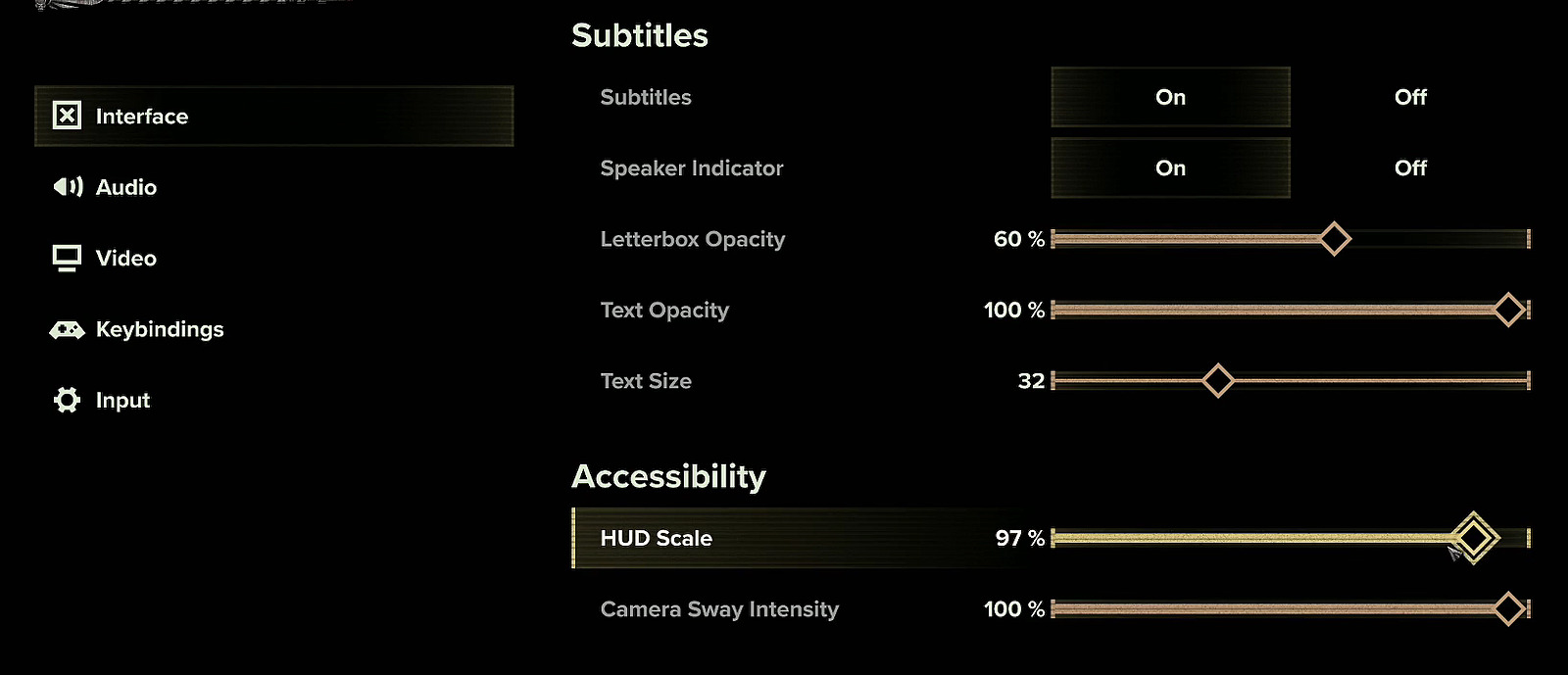
This adjustment works because it triggers a complete recalculation of UI element positioning and data binding. The game engine rebuilds the interface components from scratch, clearing any corrupted state data that caused the display inaccuracies. For persistent cases, try cycling between different scale values—adjust to 95%, apply changes, then return to your preferred setting. The temporary visual rescaling is a small price to pay for restored tactical awareness.
Advanced users can combine this with resolution changes for additional refresh triggers. Switch to windowed mode temporarily, apply HUD scale changes, then return to fullscreen. This dual-approach often resolves even the most stubborn UI freezing issues that single-method approaches might miss.
When the primary HUD scaling fix proves insufficient, several advanced techniques can address deeper system issues. Begin by clearing the game’s local cache files, which sometimes retain corrupted UI state information between sessions. Navigate to the game’s installation directory and delete the cache folder, then restart the application to regenerate clean files.
Display setting optimization provides another troubleshooting avenue. Ensure your graphics drivers are updated to the latest stable version, as compatibility issues with newer game engines can contribute to UI problems. Disable any overlay applications like Discord or Steam overlays temporarily to identify potential conflicts with Darktide’s interface rendering.
For persistent cases, verify game file integrity through the Steam client. Right-click on Darktide in your library, select Properties > Local Files > Verify Integrity of Game Files. This process identifies and replaces any corrupted game data that might be contributing to the UI issues. The verification typically takes 2-5 minutes depending on your system speed.
Monitor developer communications for patch announcements addressing specific UI bugs. The development team has committed to weekly updates during the beta period, with many interface-specific fixes already scheduled for upcoming releases.
The pre-order beta access period continues through November 29, providing players extended opportunity to experience the game while helping developers identify and resolve technical issues. Registration remains available at any point following game pre-order, with wave-based access ensuring server stability and manageable player loads.
Weekly content additions and technical improvements roll out throughout the beta phase, addressing not only UI problems but also gameplay balance, performance optimization, and stability enhancements. These incremental updates demonstrate Fatshark’s commitment to refining the experience based on community feedback.
Mark your calendars for the full launch on November 30, when Warhammer 40,000: Darktide officially releases with substantial content including five distinct combat zones, thirteen varied missions with multiple objectives, and special in-game events that expand the narrative experience. The development roadmap suggests regular post-launch support similar to their previous title, Vermintide 2.
While current UI issues may frustrate beta participants, the responsive development approach and comprehensive Complete Guide to technical troubleshooting suggests these issues will see resolution before official launch. Players can expect a polished experience similar to established titles like Class Guide implementations in other cooperative shooters.
Action Checklist
- Access Interface settings and adjust HUD Scale by 1%
- Cycle between scale values if initial adjustment doesn’t work
- Clear game cache files and restart application
- Update graphics drivers and disable conflicting overlays
- Verify game file integrity through Steam client
No reproduction without permission:Game Guides » How to fix UI stuck bug in Warhammer 40,000: Darktide Complete guide to fixing UI stuck bugs in Warhammer 40,000: Darktide with advanced troubleshooting techniques