
TL;DR
- Connect Battle.net to Twitch before April 27 for guaranteed beta access
- Watch 4 hours of partnered streams during the 8-hour drop window
- Official registration offers backup option but has lower success rates
- Monitor progress via Twitch Drops menu and claim rewards promptly
- Prepare accounts in advance and avoid common connection issues
Games and Esports Articles Overwatch
Blizzard Entertainment launched the inaugural closed beta testing phase for Overwatch 2 on April 26, marking a significant milestone for the franchise. This early access period provides players with exclusive first-hand experience of the game’s new features, including hero reworks and gameplay mechanics. For enthusiasts eager to participate immediately, we’ve consolidated every available method to obtain client access within this comprehensive guide.

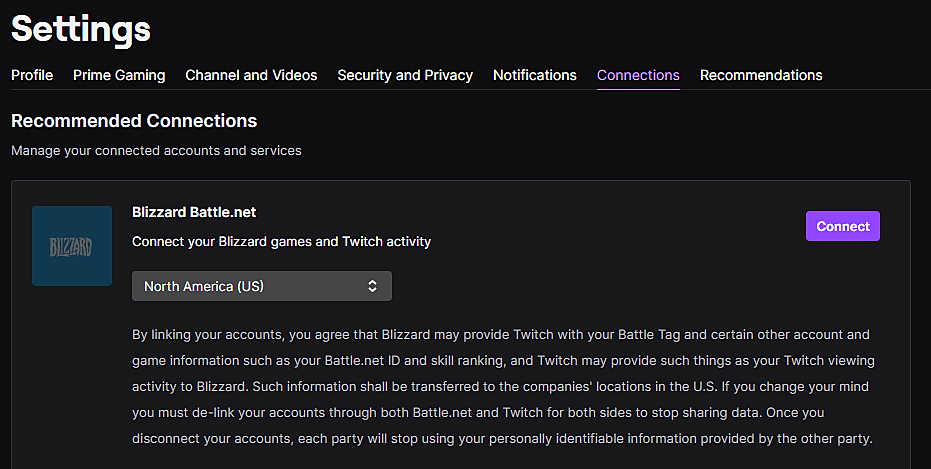
The most reliable approach involves securing access through Twitch Drops, which provides guaranteed beta keys to qualified participants. Begin by linking your Battle.net gaming account with your Twitch profile through the dedicated connections settings page. This integration process requires authentication from both platforms to ensure secure account synchronization.
To initiate the connection, navigate to Twitch’s settings interface and select the Battle.net integration option. You’ll need to provide your Twitch credentials followed by Battle.net authentication to complete the linkage. This foundational step must be completed before the drop campaign commences.
Mark your calendar for April 27 at 10:00 AM Pacific Time, when the exclusive drop event activates. This limited-time campaign spans precisely eight hours, concluding at 6:00 PM PT. During this window, you must accumulate four total hours of viewing time across officially partnered Overwatch 2 streams.
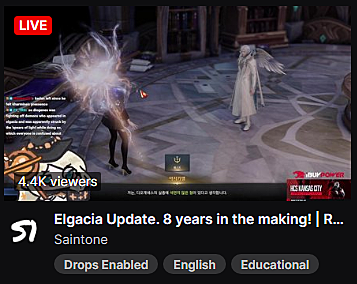
Identifying eligible streams becomes straightforward by monitoring for the distinctive “Drops Enabled” indicator displayed beneath active broadcasts. This visual marker distinguishes participating channels from regular streams, ensuring your viewing time contributes toward beta access eligibility.
Track your progression through Twitch’s dedicated Drops interface, accessible via the user profile menu in the platform’s upper-right corner. Upon completing the viewing requirement, promptly claim your reward through this interface to secure your Overwatch 2 beta invitation.
The secondary method involves enrolling through Blizzard’s official beta registration portal, though this approach offers considerably lower certainty of selection. This pathway requires prospective testers to possess the original Overwatch title on PC and maintain an active Battle.net account. Simply authenticate on the registration page and explicitly opt into beta consideration.
Successful registration places your account within the candidate pool for both current and future testing phases. Maintain regular email monitoring following enrollment, as invitation notifications arrive exclusively through this channel without additional alerts.
Blizzard employs sophisticated selection algorithms that evaluate multiple factors including geographic distribution, system specifications, and account history. This comprehensive evaluation ensures diverse testing coverage across different player demographics and hardware configurations.
Given the unpredictable nature of selection through official registration, the Twitch Drops method remains strongly recommended for players seeking guaranteed access. The direct correlation between viewing time and reward acquisition eliminates the uncertainty inherent in random selection processes.
Maximize your chances by preparing accounts at least 24 hours before the drop event, preventing last-minute technical complications. Ensure both your Battle.net and Twitch accounts exhibit good standing without restrictions that might impede reward distribution.
A common pitfall involves insufficient stream verification—always confirm the “Drops Enabled” tag remains active throughout your viewing session. Some streams may temporarily disable drops, invalidating viewing time if not monitored consistently. Consider using multiple devices or browser tabs to maintain stream connectivity during occasional disconnections.
For optimal results, schedule your four viewing hours strategically within the eight-hour window, allowing buffer time for potential technical issues. Many participants successfully combine this requirement with other activities by maintaining streams in background tabs with muted audio when necessary.
Technical troubleshooting often resolves connection issues—clear browser cache, disable conflicting extensions, or try alternative browsers if authentication problems occur. Remember that successful beta access through either method grants immediate client download privileges through Battle.net’s game management interface.
Action Checklist
- Link Battle.net and Twitch accounts through connection settings
- Verify account connections 24 hours before drop event
- Watch 4 hours of Drops Enabled streams on April 27
- Monitor progress via Twitch Drops menu
- Claim beta access and download client through Battle.net
No reproduction without permission:Game Guides » How to get Overwatch 2 beta key access. Overwatch 2 Twitch drops Complete guide to securing Overwatch 2 beta access through Twitch drops and official registration methods