
TL;DR
- Ludolf’s Teutonic armor is unobtainable through normal gameplay methods in KCD2
- Console commands provide the only legitimate way to acquire this complete armor set
- Enable developer mode through Steam properties before using console commands
- Six specific item codes add individual armor pieces to your inventory
- The armor set includes helmet, waffenrock, gauntlets, and leg protection components
Games and Esports Articles
The highly anticipated final DLC for Kingdom Come: Deliverance 2, titled Mysteria Ecclesiae, introduces several exclusive items that have captured player interest. Among these coveted additions, the Teutonic suit worn by Ritterbroder Ludolf stands out as particularly desirable for collectors and completionists. This distinctive armor ensemble represents one of the most visually striking medieval German knight outfits available in the game.
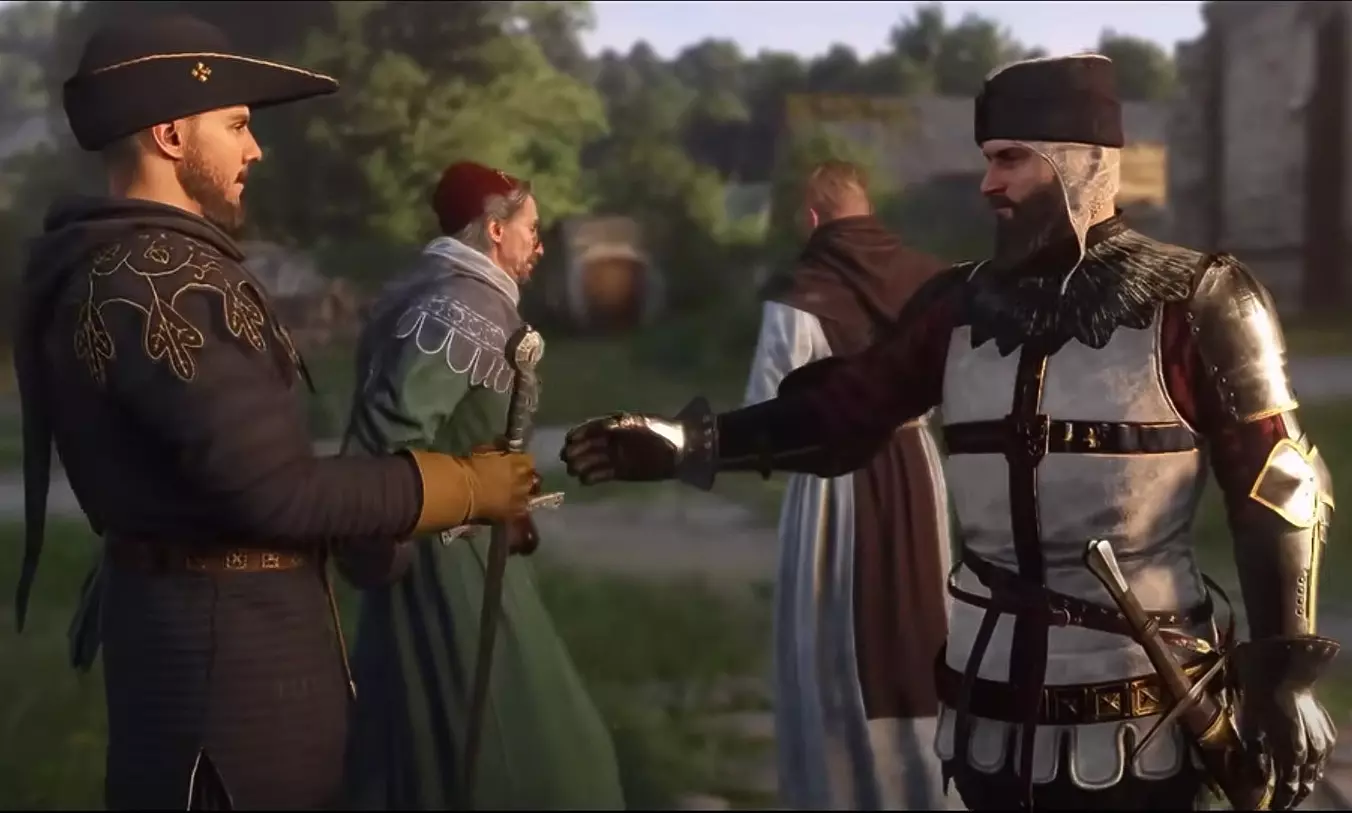
Attempting to acquire Ludolf’s armor through conventional in-game methods proves entirely futile due to deliberate design restrictions. While players can physically incapacitate the knight through combat, the game prevents any looting of his distinctive attire through standard interaction systems. This limitation extends to traditional theft approaches that typically work with other NPCs throughout the Kingdom Come universe.
The character’s programmed behavior patterns create additional barriers – Ludolf never utilizes storage containers for his possessions and maintains constant wakefulness, eliminating lockpicking opportunities that might otherwise provide access to his gear. These restrictions appear intentionally implemented to maintain narrative consistency and character integrity within the DLC’s storyline.
The exclusive method for acquiring Ludolf’s complete armor set involves utilizing developer console commands. Fortunately, Kingdom Come 2 maintains achievement functionality even when using development tools, allowing players to collect this prestigious armor without sacrificing progression tracking. The activation process requires accessing Steam’s game properties menu and entering -devmode within the launch options field, as demonstrated in the accompanying visual reference.
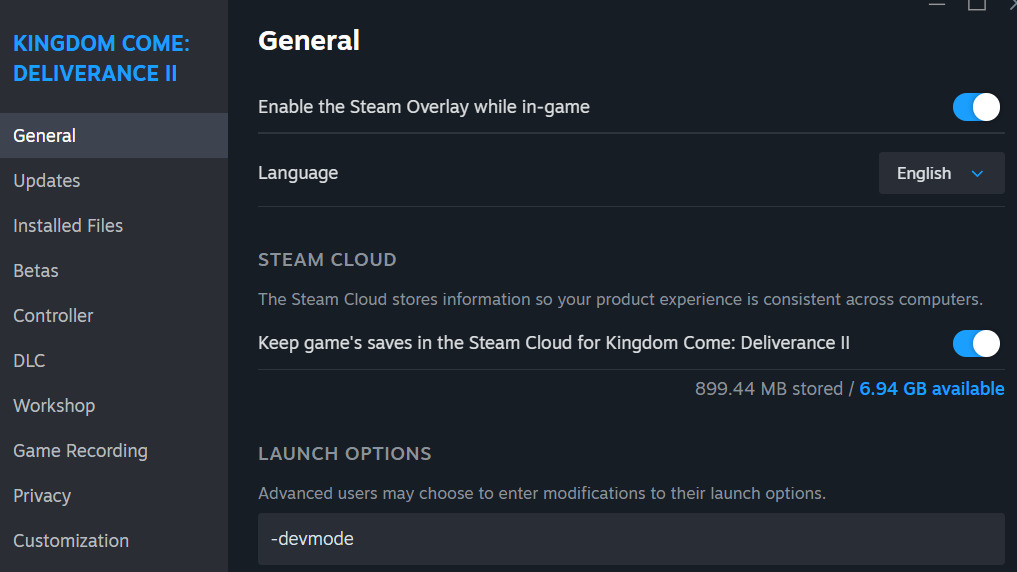
Once developer mode activates, access the in-game console interface by pressing the tilde (~) key, then input the following specific item acquisition commands:
- wh_cheat_addItem 2366d5d2-89f2-4467-bab1-f522b64ad2b1
- wh_cheat_addItem 64e44d04-f3d8-47eb-9cb7-99ea251fa344
- wh_cheat_addItem 701e2d4b-e7bd-406c-b24b-297688ad969e
- wh_cheat_addItem 9dd30e40-765c-4182-a748-46c29c11690d
- wh_cheat_addItem b205fa9c-02b1-4821-821c-d36fd63a3584
- wh_cheat_addItem f2ddfa19-4849-4f85-85c5-d59e4a5526ff
Executing these commands successfully transfers the complete Teutonic armor ensemble directly into your character’s inventory system. The collection comprises six distinct components: ceremonial headwear, protective helmet, distinctive waffenrock tunic, arm defenses, leg protection, and functional gauntlets.

For players encountering issues with console command execution, verify that developer mode activates correctly by checking for console accessibility in-game. If commands fail to produce items, ensure precise copying of the UUID codes without additional spaces or character modifications. Some players report better success when entering commands during gameplay rather than from menu screens.
The armor pieces maintain their historical accuracy while providing substantial protection values comparable to other late-game heavy armor sets. When combined with proper character class optimization from our Class Guide, this ensemble creates a formidable combat-ready appearance. Consider exploring our Complete Guide for additional medieval combat strategies that complement this armor’s capabilities.
How to get good or bad ending in Mysteria Ecclesiae DLC for KCD2. Right choices for best ending in The Time Has Come quest
Solving the mystery.
Action Checklist
- Access Steam game properties and enable developer mode with -devmode parameter
- Launch Kingdom Come 2 and open console with ~ key during gameplay
- Input all six console commands precisely as provided
- Verify all armor components appear in inventory
- Check our Weapons Unlock guide for complementary gear optimization
No reproduction without permission:Game Guides » How to get Teutonic knight Ludolf’s armor in Mysteria Ecclesiae DLC in KCD2. Console commands for Ludolf’s armor in Kingdom Come 2 Complete guide to obtaining Ludolf's Teutonic armor in KCD2 Mysteria Ecclesiae DLC using console commands