
TL;DR
- Multi-binds enable precise jumpthrows, null movement, and de-subtick mechanics in CS2
- Community-developed workaround bypasses Valve’s August ban on complex scripting
- Config files require proper installation in CS2’s cfg folder with console activation
- Works on custom servers but may trigger anti-cheat on official matchmaking
- Method likely temporary as developers continue to patch exploits
Games and Esports Articles CS 2
The Counter-Strike 2 community has ingeniously developed methods to restore multi-bind functionality following Valve’s comprehensive ban implemented in August. This restriction emerged in response to the Snap Tap controversy that raised competitive integrity concerns. Multi-binds serve essential purposes for dedicated players, enabling pixel-perfect grenade trajectories, consistent jumpthrow executions, and specialized movement techniques. These scripting solutions also facilitate “de-subticked” movement mechanics crucial for bunny-hopping, surfing, and KZ community servers. Here’s your definitive guide to implementing them in the current CS2 environment.
While these binding configurations aren’t explicitly prohibited by Valve’s VAC system or Faceit’s anti-cheat, their removal from the official game suggests developers consider them unfair advantages. You can safely employ them on community-operated servers. Important note: Valve’s servers automatically detect and block Snap Tap movement patterns, so any attempts to replicate this specific technique will result in immediate disconnection.
How to make multi-binds in CS2?
The innovative workaround was pioneered by community member Leiti and thoroughly documented through YouTube tutorials. While technically advanced users can construct these configurations manually, downloading his pre-configured files offers a significantly more accessible approach. Follow this detailed installation procedure:
- Access the configuration package through this download link to obtain the essential files.
- Navigate to your CS2 configuration directory using this path: SteamsteamappscommonCounter-Strike Global Offensivegamecsgocfg.
- Extract all downloaded archive contents directly into your cfg folder.
- Open the multi.cfg configuration file using any text editor and personalize the key bindings according to your preferences.
- During game initialization, enter the command exec multi into your developer console.
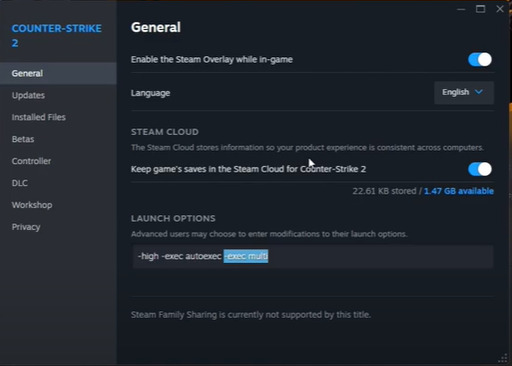
- For permanent activation, incorporate exec “exec multi” into your existing autoexec configuration or append -exec multi to your CS2 launch parameters.
NiKo explained why he smashed table after failed 1v5 at BLAST Fall Final
Review the available video demonstrations to comprehend how this technical workaround operates and implement more sophisticated adjustments. Critical reminder: game developers will probably patch this exploitation method in upcoming updates, so consider this a temporary solution rather than permanent functionality.
Donk: “S1mple is the best sniper of all time, but m0NESY can become better”
Pro Configuration Tips: When customizing your multi.cfg file, prioritize binds that enhance your specific playstyle. For entry fraggers, focus on smoke and flashbang sequences. Support players should optimize molotov and HE grenade placements. Always test new configurations in offline practice sessions before implementing them in competitive matches.
Common Installation Errors: Many users encounter issues with file path accuracy – ensure you’re placing files in the CS2-specific cfg folder, not the legacy CS:GO directory. Another frequent mistake involves incorrect console command syntax; ensure you’re using the exact formatting specified in the configuration instructions.
Action Checklist
- Download the multi-bind configuration package from the provided Dropbox link
- Locate your CS2 cfg folder using the exact directory path provided
- Extract archive contents directly into the cfg directory
- Customize key bindings in multi.cfg to match your preferred layout
- Activate configuration using console command or launch parameter method
- Test functionality in offline practice mode before competitive use
No reproduction without permission:Game Guides » How to make multi binds in CS2 after Valve’s ban? How to use Jumpthrow, null binds, de-subtick movement scripts in CS2 Master CS2 multi-binds for jumpthrows, null binds, and de-subtick movement with this comprehensive guide