
TL;DR
- Professional CS2 players primarily use community DM servers for instant respawns and better practice environments
- Access community servers through Steam’s server browser via the globe icon in CS2’s Play menu
- European pros frequent Cybershoke servers while NA players prefer PRACC.com
- Specialized servers like HSDM and PistolDM target specific skill development
- Regular participation increases chances of encountering top-tier professional players
Games and Esports Articles CS 2
Counter-Strike 2 competitors consistently utilize Deathmatch sessions for warm-up routines and mechanical practice. Elite professional gamers follow identical preparation patterns but gravitate toward specialized community-operated servers rather than Valve’s standard matchmaking options. Were you aware that accessing these platforms enables direct competition against renowned players such as ropz, Spinx, and NiKo? This comprehensive guide reveals the exact methodology.
Top-tier competitors predominantly avoid the default Valve Deathmatch system, instead opting for community-hosted alternatives that provide superior training conditions. The advantages include immediate respawn mechanisms that eliminate downtime, customizable gameplay formats tailored to specific skill development, and enhanced server functionality that standard matchmaking cannot replicate.
Dedicated community members consistently report higher probabilities of encountering professionals on specific dedicated servers. European CS2 professionals frequently train on Cybershoke platforms, while North American elites show preference for PRACC.com infrastructure. Consistent participation on these servers significantly increases your opportunity to compete against world-class players. Understanding these environments can dramatically accelerate your own skill progression.
For players unfamiliar with community server navigation, follow this detailed step-by-step process to begin your journey toward professional-level practice sessions:
- Initiate CS2 and select the Play option from the main interface
- Locate the globe-shaped icon positioned adjacent to Workshop Maps sections. Selecting this icon redirects you to Steam’s Community Server Browser interface. Important note: this opens as a separate Steam overlay window rather than within CS2’s native interface
- Initial loading may require brief waiting periods as server lists populate. If servers fail to appear, utilize the Refresh function located in the upper-right corner
- Navigate to the bottom section and activate Change Filters options. This enables precise server customization and search parameters. You can directly input specific server names for targeted access
- Prioritize servers displaying high player counts for maximum engagement. Clicking the Players column header automatically organizes servers by population density. Choose your preferred server and initiate connection, then return to CS2 via alt-tab functionality to commence gameplay
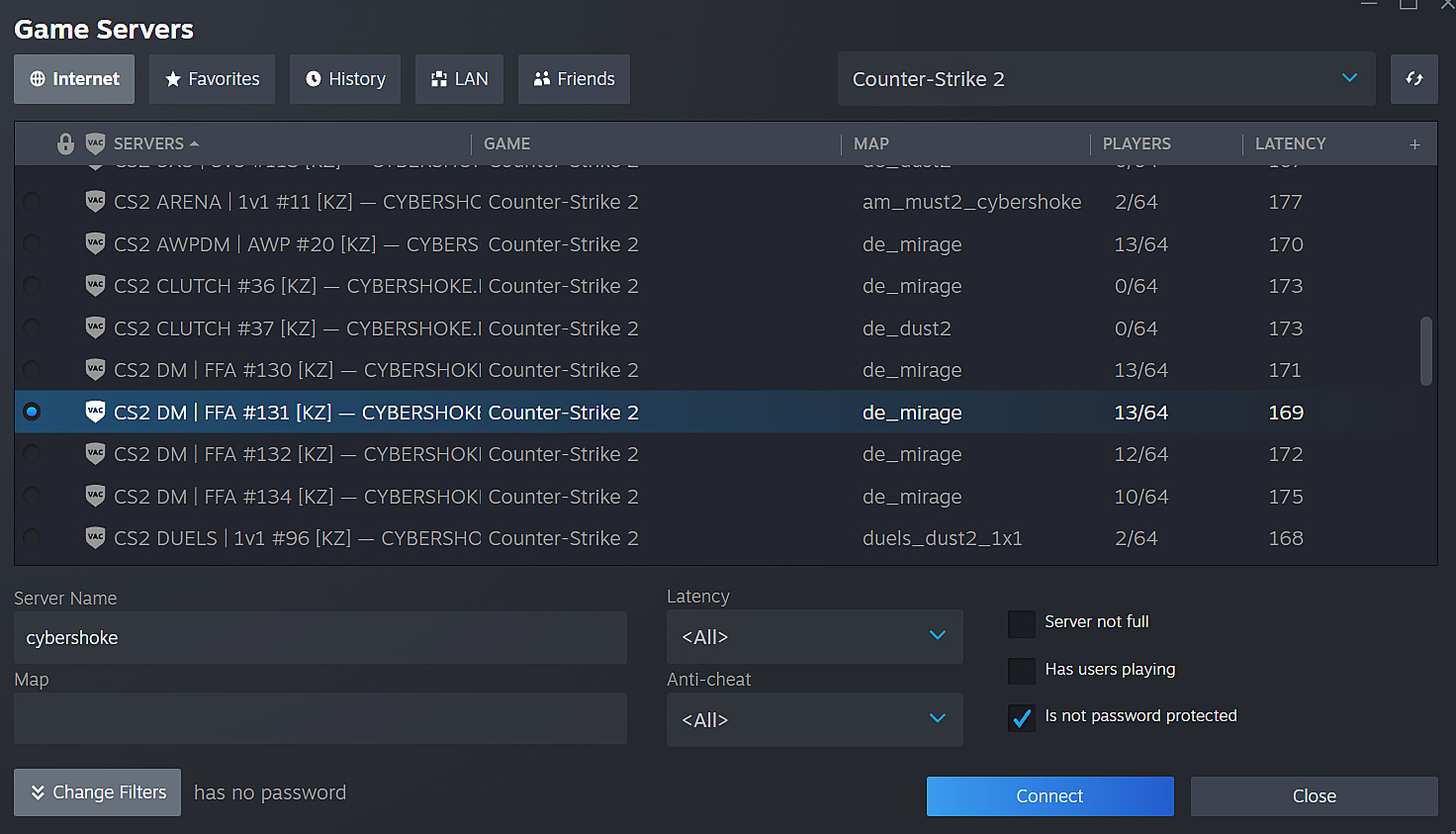
The community server ecosystem offers diverse Deathmatch variations designed to target specific skill development areas. Headshot-only matches (HSDM) dramatically improve precision and crosshair placement, while pistol-exclusive servers (PistolDM) enhance eco-round proficiency and sidearm accuracy. Additionally, retake scenarios simulate post-plant situations, clutch servers recreate 1vX scenarios, and duel platforms provide concentrated aim training environments.
Each specialized server type addresses distinct mechanical and strategic competencies. HSDM servers force players to prioritize head-level crosshair positioning, accelerating muscle memory development for instant elimination encounters. PistolDM sessions build fundamental movement and accuracy skills that translate directly to pistol rounds and force-buy situations. For comprehensive weapon mastery, consult our Weapons Unlock guide for additional training methodologies.
Maximizing your learning opportunities during professional player encounters requires strategic approaches rather than random engagement. Focus on observing their crosshair placement patterns, movement techniques during engagements, and positioning choices relative to common angles. Avoid excessive focus on defeating them; instead, analyze how they approach duels and position themselves during respawn cycles.
Community server etiquette dictates respectful behavior without excessive fan attention. Professional players utilize these environments for serious practice, so maintain appropriate interaction levels while absorbing their gameplay methodologies. Understanding professional Class Guide principles can enhance your understanding of role-specific positioning.
Regular participation during peak professional practice hours (typically afternoon and evening in respective regions) increases encounter probabilities. Consistent performance on these servers not only provides elite practice but also integrates you into the competitive community infrastructure. For broader strategic development, explore our Complete Guide to advanced gaming techniques.
How spawns changed after February update in CS2? All new spawn locations of Anubis, Inferno, Mirage, Nuke, Overpass, and Vertigo
Gotta learn new timings now!
Action Checklist
- Navigate to Community Server Browser via globe icon in Play menu
- Filter and select high-population servers in your region
- Practice 30 minutes daily on specialized servers (HSDM, PistolDM)
- Observe professional player techniques without disruptive interaction
- Analyze and incorporate observed strategies into your own gameplay
No reproduction without permission:Game Guides » How to play against pro CS2 players in DM? Deathmatch servers with professional players Master community DM servers to practice against CS2 pros and elevate your gameplay skills