
TL;DR
- Reverse trading allows CS2 skin recovery within 7 days but triggers 30-day trade bans
- Only Season 3+ items qualify; trade-protected skins have severe usage restrictions
- The process affects ALL recent trades simultaneously – no selective item recovery
- Steam Market purchases remain unaffected by reverse trading mechanics
- Proper planning and verification can prevent most trade disputes requiring reversal
Games and Esports Articles CS 2
Valve has implemented a crucial safety mechanism within CS2 that enables players to retrieve their valuable skins following trading errors, fraudulent activities, or temporary account compromises. This innovative system grants every Steam user the capability to nullify any completed trade transaction during a seven-day window after execution.
This protective functionality operates exclusively for CS2 inventory items, leaving other game assets without similar safeguards. All weapon finishes and cosmetic items obtained subsequent to the Season 3 implementation automatically receive Trade Protected designation. Visual indicators appear as yellow warning symbols adjacent to protected items, clearly signaling their protected status as demonstrated in the accompanying visual reference. Crucially, trades finalized before the July 15 patch deployment remain ineligible for reversal procedures.
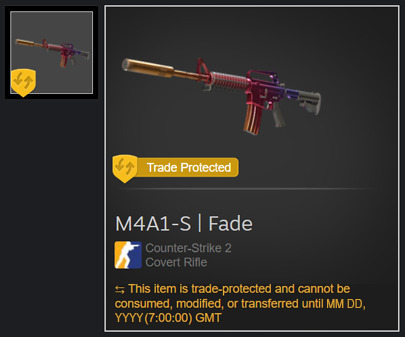
As evidenced in the visual reference above, trade-protected inventory items face significant functional limitations beyond simple in-game equipment usage. For instance, players cannot unseal recently acquired container items from other users, apply decorative stickers to firearms, or remove existing stickers. Another critical consideration for active traders and bulk purchasers: These protected cosmetics cannot be transferred to storage containers for organizational purposes.
To initiate an item trade reversal procedure, players must navigate to their comprehensive trade history section within the Steam interface. Utilize this direct access link for immediate navigation. The reversal activation becomes available through a clearly marked interface button within the trade history panel.

Several critical considerations demand attention before proceeding. Upon activating trade reversal, every transaction completed within the preceding seven-day period will be automatically canceled with all involved items returning to their original owners. The system operates comprehensively rather than selectively. Furthermore, your Steam account will receive an automatic 30-day suspension from Community Market activities and trading functions.
When players elect to reverse trades, every exchange containing Trade Protected items undergoes reversal. All assets from these transactions revert to previous ownership status, while the initiating account faces trading and Steam Community Market restrictions for 30 days to prevent potential security incidents.
Should another participant reverse a trade where you were involved, the affected items automatically repatriate to your inventory. Steam clients display pop-up notifications alerting users to these changes. These returned skins maintain their original trade-protected status throughout the process.
All outlined restrictions apply exclusively to direct peer-to-peer trading transactions. Players maintain the ability to purchase items from other users through the Steam Market exactly as before the system implementation. Sellers cannot reclaim items sold through market transactions using this mechanism.
Seasoned traders should implement systematic verification protocols before finalizing any high-value transactions. Always cross-reference the trade partner’s Steam profile for authenticity indicators, including account age, game ownership history, and community standing. Consider establishing incremental trading relationships for unfamiliar partners rather than single high-stakes exchanges.
The 30-day market and trading suspension represents a significant consideration for active traders. Plan your reversal timing strategically around major trading activities or market fluctuations. The comprehensive nature of the reversal means you cannot selectively recover specific items while preserving other transactions.
For maximum security, maintain detailed transaction logs including timestamps, participant details, and item specifics. This documentation proves invaluable if disputes arise or if you need to provide evidence to Steam Support. Additionally, consider utilizing Complete Guide resources to understand broader gaming economy principles that apply across different titles.
Understanding weapon skin economics can significantly enhance your trading decisions. Our Weapons Unlock guide provides complementary insights into virtual item valuation trends.
Strategic class selection in competitive shooters often influences skin preferences and values. Explore our Class Guide for insights into how gameplay preferences affect cosmetic item demand cycles.
Remember that reverse trading serves as a safety net rather than a primary trading strategy. The substantial restrictions make prevention through careful trading practices vastly preferable to post-factum recovery attempts.
Action Checklist
- Verify item trade protection status before completing any transaction
- Document all trade details including participant names, dates, and specific items
- Access trade history through Steam interface before initiating reversal
- Evaluate 30-day trading ban consequences relative to recovery benefits
- Monitor for Steam notifications if involved in trades reversed by other participants
No reproduction without permission:Game Guides » How to reverse trade and get back scammed or lost skins and items in CS2 Complete guide to CS2 reverse trading: Recover scammed skins, understand restrictions, and avoid common pitfalls