
TL;DR
- Access in-game DPS via Skills panel (G key) or right-clicking skill gems
- Understand that tooltip DPS doesn’t account for all damage modifiers and mechanics
- Use external calculators like EfficientRogue’s spreadsheet for accurate damage simulation
- Analyze DPS to optimize skill gems, equipment choices, and passive tree selections
- Avoid common mistakes by testing different scenarios before committing to builds
Games and Esports Articles
As you advance through Path of Exile 2, acquiring powerful skills and superior equipment becomes essential for progression. Understanding how to measure and optimize your damage output through DPS (damage per second) tracking provides critical insights for build development. This comprehensive guide explores multiple methods to accurately assess your combat effectiveness in PoE 2.
DPS represents the average damage your skills inflict over one second, but this metric becomes increasingly complex due to PoE 2’s intricate damage calculation system. The game factors in elemental damage, critical strikes, damage over time effects, attack speed, and numerous modifiers that interact in multiplicative ways. Mastering DPS analysis helps you identify which skills and equipment combinations deliver maximum performance for your specific playstyle.
Many players underestimate how conditional modifiers, enemy resistances, and skill synergies affect their actual damage output. Proper DPS tracking prevents wasted currency on ineffective gear and ensures you’re progressing efficiently through endgame content. Learning to interpret damage numbers correctly separates casual players from expert build crafters.
Path of Exile 2 offers integrated damage tracking through its Skills interface, accessible by default when you press G on your keyboard. This panel displays all equipped skill gems with their current DPS values, allowing quick comparisons between different abilities.
An alternative method involves right-clicking directly on skill gems within your inventory. This action reveals a detailed breakdown showing individual skill performance metrics, including base damage, attack/cast speed, and calculated DPS. The interface organizes skills visually, making it easy to identify your highest-damage options for various combat situations.
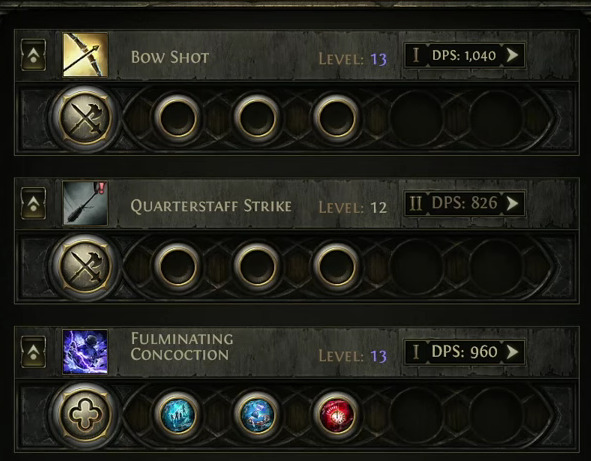
When analyzing these numbers, consider that tooltip DPS reflects ideal conditions without accounting for enemy defenses or situational modifiers. For precise build planning, you’ll need to supplement this basic information with more advanced calculation methods discussed later in this guide.
How to unlock and change your hideout in PoE 2. Where are hideouts in Path of Exile 2
Establishing your base in PoE 2.
The primary limitation of PoE 2’s integrated tooltip is its inability to display actual combat DPS against specific enemies. The game’s damage calculation excludes numerous factors including enemy resistances, conditional buffs that activate during combat, and complex skill interactions that modify output dynamically.
For comprehensive build planning and experimentation outside gameplay sessions, dedicated DPS calculators provide superior accuracy. These tools help prevent costly refunds by allowing you to test different skill gem combinations, passive tree allocations, and equipment setups before committing resources.
While more sophisticated DPS simulators will emerge as PoE 2 develops, currently we recommend the spreadsheet created by content creator EfficientRogue. Access this advanced calculator using this link. The accompanying video tutorial demonstrates how to input your character data and interpret the resulting damage calculations effectively.
How to respec Ascendancy skills points in PoE 2. How to change Ascendancy class in Path of Exile 2
Adjusting your Ascendancy in PoE 2.
Effective DPS optimization requires understanding how different game mechanics interact. For example, increasing attack speed might show higher tooltip DPS, but if you lack accuracy or critical strike chance, your actual damage could be significantly lower. External calculators help identify these hidden inefficiencies before you invest valuable resources.
A common mistake players make is focusing solely on maximum damage numbers while ignoring consistency. Skills with high variance might show impressive peak DPS but deliver unreliable performance in crucial combat situations. Always analyze both average and minimum damage values.
Advanced calculation strategies involve testing your build against different enemy types with varying resistance profiles. The most effective PoE 2 characters maintain strong damage output across diverse endgame content rather than excelling in narrow scenarios.
When using DPS calculators, input data from multiple character levels and equipment tiers to understand your progression curve. This forward-looking analysis helps you plan skill gem upgrades, identify key passive tree nodes, and prioritize equipment acquisitions based on their damage impact.
Remember that PoE 2’s damage system continues to evolve, so regularly updating your calculation methods ensures ongoing optimization. As new mechanics and content are introduced, revisit your DPS calculations to maintain peak performance.
Action Checklist
- Press G to open Skills panel and review current skill DPS values
- Right-click skill gems in inventory for detailed damage breakdowns
- Bookmark EfficientRogue’s DPS calculator for advanced build planning
- Test 3 different equipment setups using external calculator before purchasing
- Analyze damage against different resistance profiles to identify build weaknesses
No reproduction without permission:Game Guides » How to see DPS in PoE 2. How to display real effective damage using DPS calculator in Path of Exile 2 Master Path of Exile 2 DPS tracking with in-game tools and advanced calculator techniques