
TL;DR
- Genetic Apex remains available through hidden menu navigation
- New Space-Time Smackdown adds 140 cards and trading features
- Access older expansions via ‘Select other booster packs’ button
- Pack points are expansion-specific and don’t transfer between sets
- Strategic pack selection maximizes collection completion efficiency
Despite the recent Space-Time Smackdown expansion launch, the Genetic Apex collection remains fully accessible within Pokémon TCG Pocket. Many players mistakenly believe older expansions become unavailable when new content drops, but this isn’t the case—you simply need to navigate through the updated interface to locate them.
The Space-Time Smackdown update introduces a substantial 140 new cards to collect while also activating the highly anticipated trading functionality. This major content drop significantly alters the application’s frontend presentation, most notably removing direct home screen access to Genetic Apex booster packs that were available at launch.
This comprehensive guide demonstrates the streamlined process for switching between available expansions, ensuring you can efficiently access both current and legacy card collections. Understanding this navigation system is crucial for maximizing your collection strategy and taking full advantage of the game’s evolving content ecosystem.

Switching between available booster packs in Pokémon TCG Pocket requires navigating through a secondary menu that many players overlook. The process is intuitive once you understand the interface layout, though the option isn’t immediately visible from the main screen.
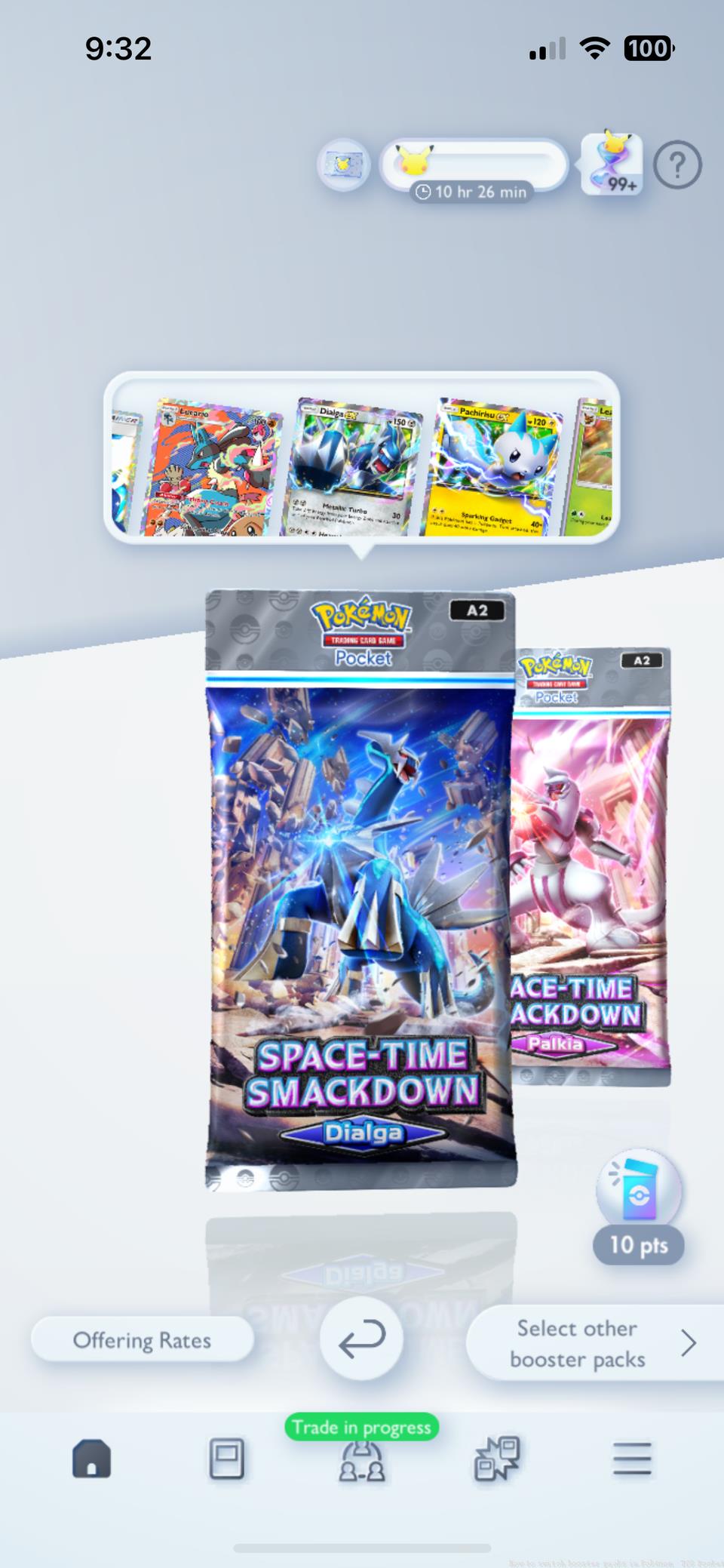 Image: Creatures, DeNA/The Pokémon Company via Polygon
Navigation Steps:
- Begin from the game’s homepage and select any visible booster pack display. The specific pack you choose initially doesn’t matter—whether Mythical Island or another option—as the subsequent navigation path remains consistent regardless of your selection.
- Once the booster pack interface loads, direct your attention to the bottom right corner of your screen. Here you’ll find the crucial “Select other booster packs” button that serves as your gateway to all available expansions.
- The selection screen that appears provides comprehensive access to every expansion currently in rotation. You’ll clearly see legacy collections like Genetic Apex alongside newer releases. Simply tap your desired expansion to immediately switch your pack opening focus to that specific set.
This streamlined process ensures you’re never locked out of previous expansions and can strategically choose which cards to pursue based on your collection goals and current meta considerations.
Successfully navigating between expansions is only the first step toward building an optimal card collection. Understanding how pack points function across different expansions can significantly impact your resource management efficiency.
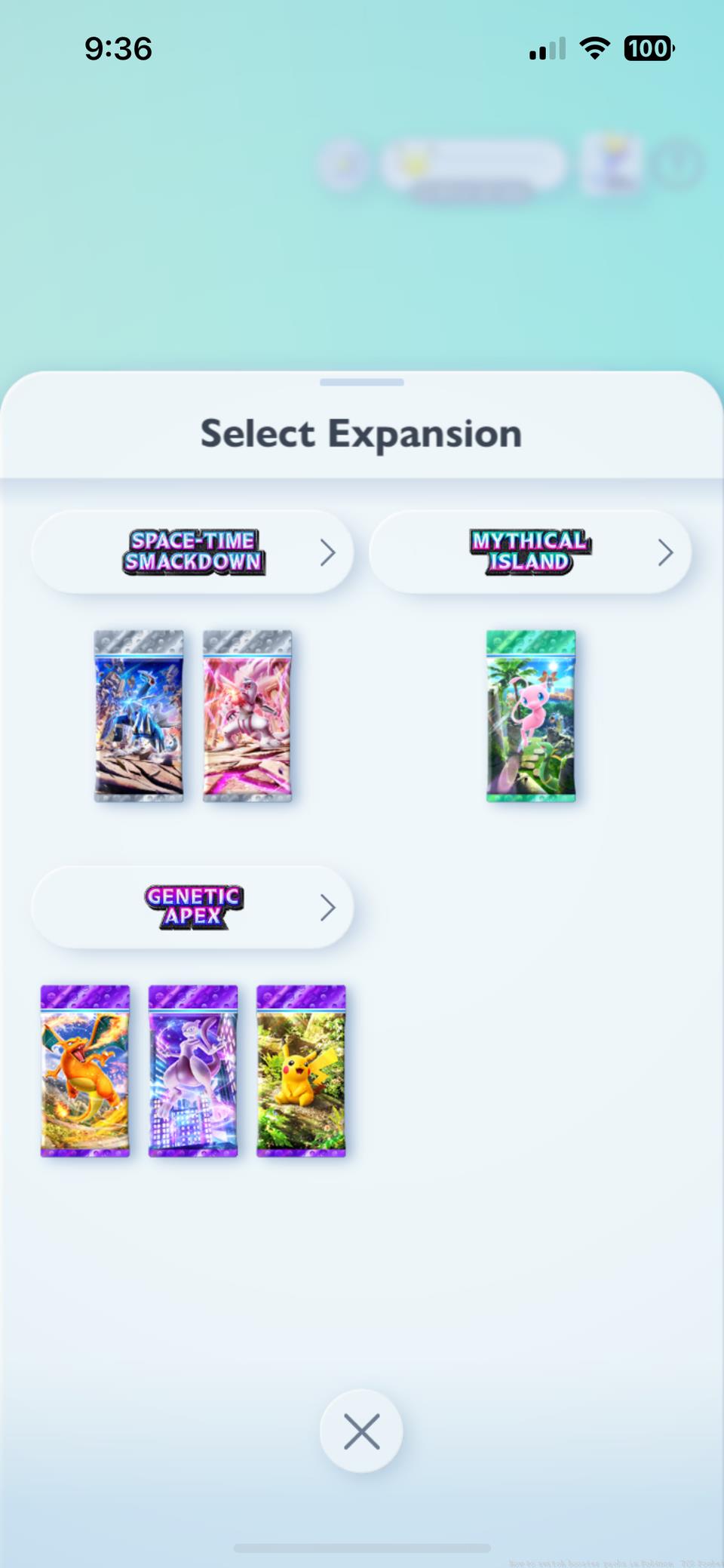 Image: Creatures, DeNA/The Pokémon Company via Polygon
Key Strategic Considerations:
Pack points accumulate separately for each expansion, meaning resources dedicated to Space-Time Smackdown won’t transfer to Genetic Apex pursuits. This separation necessitates careful planning about where to invest your opening sessions based on current collection gaps and deck building requirements.
The introduction of trading functionality with Space-Time Smackdown adds another strategic layer. Consider focusing on expansions containing high-demand trade cards if you plan to engage actively with the player economy. Some veteran collectors recommend alternating between new and old expansions to maintain balanced progression across multiple sets.
For players working through collection challenges in other games, the discipline of strategic resource allocation translates well to Pokémon TCG Pocket. Meanwhile, those familiar with class-based systems will appreciate how different expansions often focus on specific Pokémon types or battle strategies.
You’ll continue earning pack points exclusively for whichever expansion you have active when opening packs. For comprehensive gaming strategy insights that apply across multiple titles, our complete guide collection offers additional professional tips.
Action Checklist
- Access any booster pack from home screen to enter selection interface
- Locate and tap ‘Select other booster packs’ in bottom right corner
- Choose desired expansion from comprehensive list including Genetic Apex
- Plan pack point allocation strategy based on collection gaps
- Coordinate expansion selection with trading economy opportunities
No reproduction without permission:Game Guides » How to switch booster packs in Pokémon TCG Pocket Master Pokémon TCG Pocket pack switching with expert navigation tips and collection strategies