
TL;DR
- Press T to access waiting wheel for precise time skipping
- Complete prologue missions before time skipping becomes available
- Monitor character status effects that occur during waiting periods
- Strategic waiting enhances stealth missions and resource management
- Cannot wait during combat or critical story sequences
Games and Esports Articles
Strategic time management becomes essential throughout your journey in Kingdom Come Deliverance 2. Whether coordinating with NPCs on specific schedules, preparing for nocturnal infiltrations, or simply passing hours until shopkeepers open, mastering the waiting mechanic significantly enhances gameplay efficiency. This comprehensive guide explores both basic operations and advanced applications.
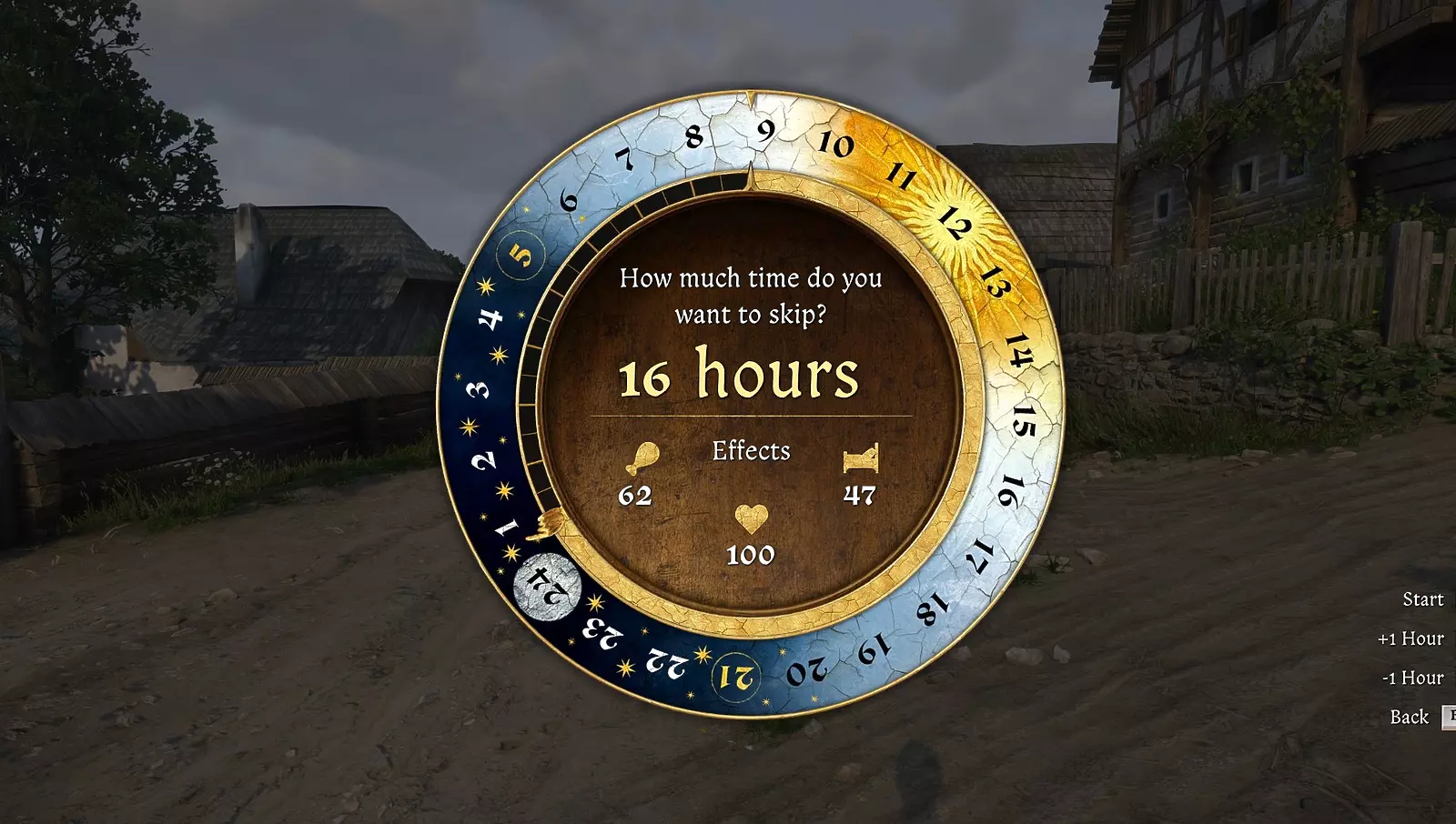
The primary control involves pressing the T key, which instantly activates an interactive time wheel interface. This circular menu displays all 24 hours, allowing precise selection of your destination time. The system calculates exact waiting duration and previews how your character’s vital statistics will evolve during this period. Unlike basic sleep mechanics, waiting maintains character consciousness while accelerating time progression.
Critical interface elements include hunger and fatigue indicators that demonstrate physiological changes. Health regeneration or deterioration becomes visible through color-coded status bars. Advanced players utilize these previews to optimize their waiting strategies, ensuring they never reach critical exhaustion or starvation levels during extended time jumps.
New players frequently encounter restrictions during early gameplay stages. The game deliberately disables time skipping throughout prologue missions to maintain narrative pacing and tutorial integrity. Once you complete the Laboratores quest sequence, full waiting functionality unlocks with an explanatory pop-up notification.
Combat situations immediately disable waiting capabilities, as do other high-tension scenarios like fleeing from guards or participating in scripted events. The developers implemented these limitations to preserve immersion and prevent mechanics abuse during critical story moments.
Character status management represents another crucial consideration. Extended waiting periods gradually increase hunger and fatigue, potentially leaving you vulnerable if these metrics approach dangerous thresholds. Strategic players often combine waiting with nearby activities like character development to maximize efficiency.
Environmental factors also influence waiting effectiveness. Safe locations like taverns or owned beds provide optimal conditions, while wilderness areas carry higher risks of random encounters interrupting your waiting period.
Seasoned players develop sophisticated waiting strategies that integrate with broader gameplay systems. For nocturnal missions, begin waiting approximately two hours before nightfall to account for travel time and preparation. This approach ensures you arrive at objectives during optimal darkness while maintaining peak character condition.
Quest optimization represents another advanced application. Many missions involve specific time windows or NPC schedules. Use waiting to precisely align your arrival times, avoiding unnecessary loitering that wastes valuable gameplay hours. Reference our complete strategy guide for additional time-saving techniques.
Common mistakes include waiting without checking character status first, resulting in exhaustion during crucial moments. Always monitor your hunger and fatigue levels, and consider consuming food or resting briefly before extended waiting periods.
Resource management synergizes perfectly with waiting mechanics. Coordinate your waiting sessions with shop operating hours, blacksmith availability, and training schedules. This systematic approach ensures you never miss opportunities due to poor timing, much like optimizing weapon loadouts for maximum combat effectiveness.

Action Checklist
- Complete prologue missions to unlock waiting functionality
- Press T key to activate waiting wheel interface
- Select destination time while monitoring status changes
- Check hunger/fatigue levels before extended waiting
- Combine waiting with travel time for optimal mission timing
No reproduction without permission:Game Guides » How to wait in Kingdom Come Deliverance 2. How to skip time in KCD2 Master time manipulation in Kingdom Come Deliverance 2 with advanced waiting strategies and pro tips