
TL;DR
- Independent testing shows Windows 10 delivers 3-8% better FPS in CS2 with identical hardware
- Windows 11’s enhanced security features and background services consume additional system resources
- Proper optimization can minimize performance gaps between both operating systems
- Consider your hardware specifications and gaming priorities when choosing between OS versions
- Regular driver updates and system maintenance are crucial for optimal CS2 performance
Games and Esports Articles CS 2
Counter-Strike 2 has now been available for nearly twelve months, bringing enhanced graphics and more demanding system requirements that push gaming hardware to its limits. Competitive players continuously seek every possible advantage to maximize frame rates and reduce input latency, with even professional esports athletes encountering performance challenges. The operating system selection represents one of the most significant yet overlooked factors affecting gaming performance. Understanding the distinctions between Windows versions becomes essential for achieving optimal in-game responsiveness.
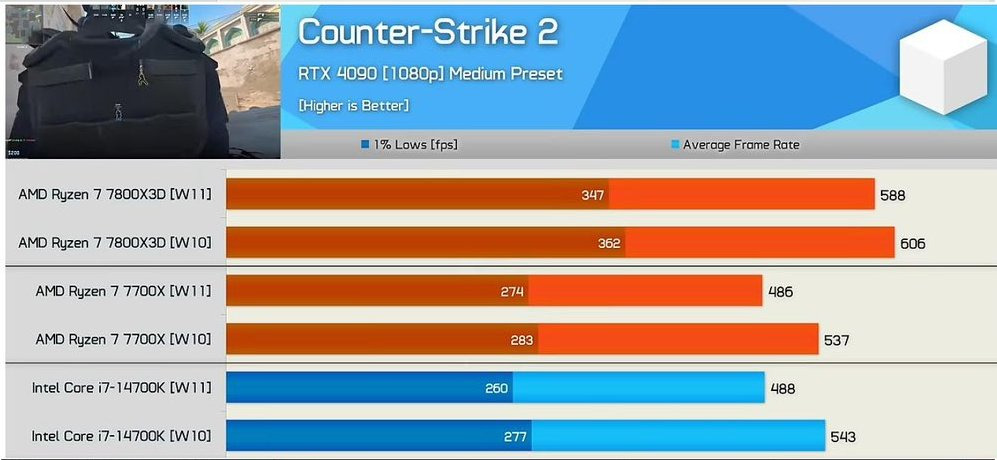
Independent researcher Pirat_Nation conducted extensive performance evaluations across multiple modern titles including Cyberpunk 2077, Homeworld 3, and Starfield to determine which operating system delivers superior gaming performance. The comprehensive testing methodology revealed that Windows 10 consistently provided higher frame rates across all tested games according to the published results. This pattern held true even when examining different hardware configurations and gaming environments.
CS2 featured prominently in these performance comparisons, with the data indicating marginally better results on Windows 10 platforms. While the testing utilized varying processor models, the graphics hardware remained consistent throughout all evaluations: NVIDIA’s flagship RTX 4090 GPU running at Medium quality settings and 1080p resolution. The performance differential typically ranged between 3-8% depending on specific in-game scenarios and map locations.
Dedicated CS2 performance analyst Thour has corroborated these findings, confirming Windows 10’s performance advantage in recent testing. It remains uncertain whether he conducted fresh evaluations, as his previous benchmark analysis from November 2023 showed negligible differences between the operating systems. This suggests that either game updates, driver improvements, or testing methodology refinements may have influenced the more recent results.
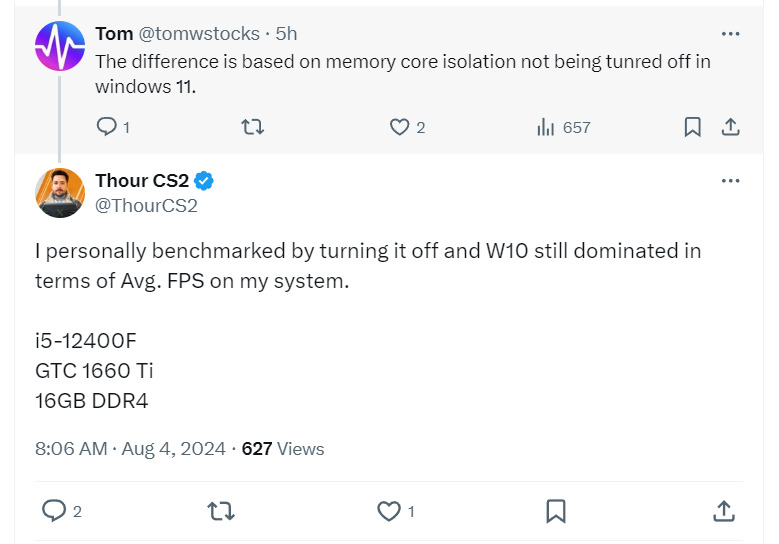
Several technical considerations explain why Windows 10 might deliver superior CS2 performance compared to its successor. Windows 11 incorporates more extensive security implementations including Virtualization-Based Security (VBS) and Hypervisor-Protected Code Integrity (HVCI), which can consume additional CPU resources and impact gaming performance. These security enhancements, while beneficial for system protection, introduce measurable overhead that affects real-time gaming applications.
The updated task scheduler in Windows 11 prioritizes foreground applications differently, which doesn’t always align with gaming optimization needs. Additionally, Windows 11’s more feature-rich interface and background services utilize more system memory and processing power, leaving fewer resources available for demanding games like CS2. Understanding these technical distinctions helps gamers make informed decisions about their operating system selection.
Memory management represents another critical differentiator between the two operating systems. Windows 10’s more straightforward memory allocation strategy often proves more efficient for gaming workloads, while Windows 11’s memory compression and intelligent standby list cleaning, though beneficial for multitasking, can introduce minor latency in gaming scenarios. For players seeking every possible competitive advantage, these subtle differences become increasingly significant.
Regardless of which operating system you choose, implementing proper optimization techniques can significantly enhance your CS2 gaming experience. For Windows 10 users, disabling unnecessary startup applications, optimizing power settings for maximum performance, and ensuring current GPU drivers provide the foundation for optimal performance. Advanced users may consider adjusting process priorities and disabling certain visual effects to maximize frame rate consistency and reduce input lag during competitive matches.
Windows 11 gamers should focus on disabling VBS and memory integrity features through the Windows Security application, which can recover some of the performance lost to security overhead. Adjusting graphics settings within CS2 itself, particularly reducing shadow quality and disabling unnecessary post-processing effects, often yields more significant performance improvements than operating system selection alone.
Regular system maintenance including disk cleanup, driver updates, and background process management remains essential for maintaining optimal gaming performance over time. Both operating systems benefit from keeping system resources dedicated to gaming during active play sessions, avoiding simultaneous resource-intensive applications. For comprehensive gaming optimization guidance, consult our Complete Guide for additional performance optimization strategies.
How to use AMD Anti-Lag 2 in CS2? Does it decrease input lag, FPS, and framerates?
No need for irons.
Action Checklist
- Update GPU drivers to latest stable version
- Disable unnecessary startup applications and background services
- Configure power settings for maximum performance
- Adjust in-game settings prioritizing performance over visuals
- Monitor system temperatures during extended gaming sessions
No reproduction without permission:Game Guides » Is Windows 10 better than Windows 11 to play CS2? What OS to use for best FPS in CS2 Windows 10 vs Windows 11 performance analysis for CS2 with optimization strategies