
TL;DR
- Loot filters are essential for managing PoE 2’s overwhelming item drops and must be configured externally
- NeverSink and Cyberion offer the most popular community filters with multiple strictness tiers
- Installation requires downloading filters to specific folders then selecting them in-game options
- Multiple filters can be used simultaneously and switched based on gameplay needs
- Advanced customization through text editing enables precise control over displayed items
Games and Esports Articles
Path of Exile 2 introduces numerous innovative mechanics, yet acquiring optimal equipment remains central to progression. As you advance through the game, the sheer volume of dropped items can become unmanageable, with many pieces losing relevance to your current build. This comprehensive guide demonstrates how to implement and optimize loot filters in PoE 2 to streamline your looting experience.
Unlike many ARPGs, loot filters in Path of Exile 2 require external file management. These filters must be manually edited in text format rather than configured through in-game interfaces. Consequently, the most efficient approach involves utilizing pre-made filters crafted by experienced community members.
The Path of Exile 2 community features numerous dedicated players who generously share their custom filter configurations on official discussion boards. One prominent example is the filter developed by community member Cyberion, which significantly simplifies item categorization. This filter emphasizes crucial loot categories including currency items, jewelry pieces, and equipment based on rarity tiers. You can obtain this filter here. However, the most widely adopted filter originates from NeverSink, accessible via this download link. These filters provide multiple strictness levels and extensive customization possibilities.

- Download your preferred loot filter (or develop your own custom version) and extract the files to DocumentsMy GamesPath of Exile 2OnlineFilters directory
- Access the Game settings tab within the Options menu while in-game
- Locate the Item Filter section and select your desired filter configuration
- You can maintain multiple filter presets and seamlessly transition between them according to your current gameplay requirements
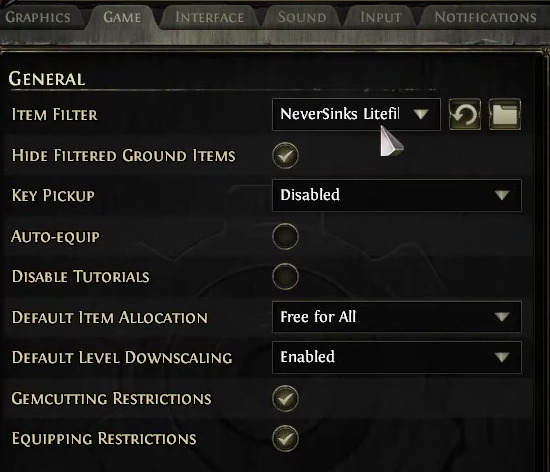
For players seeking granular control, manual filter editing provides unlimited customization potential. Understanding filter syntax enables you to create rules targeting specific item bases, modifier combinations, or socket configurations. Advanced users often maintain separate filters for early leveling, end-game mapping, and specialized farming strategies. When customizing, always backup original files and test changes incrementally to avoid disrupting your gameplay experience.

Action Checklist
- Research and download 2-3 community filters to compare features
- Extract filter files to correct directory: DocumentsMy GamesPath of Exile 2OnlineFilters
- Configure primary filter in-game through Options > Game tab
- Test filter effectiveness during gameplay and adjust strictness as needed
- Create specialized filters for different gameplay phases (leveling, mapping, bossing)
No reproduction without permission:Game Guides » How to filter loot in PoE 2 to see or hide items. How it install custom item filter in Path of Exile 2 Master PoE 2 loot filtering with expert setup, top community filters, and advanced customization techniques