
TL;DR
- Scav queues depend on available slots in active raids – choose less popular maps and optimal times
- PMC matching faces server capacity limits – select appropriate servers based on population
- Use server selection strategically: low-pop for capacity issues, high-pop for player matching
- Monitor real-time server status and adjust strategy accordingly
- Combine multiple optimization techniques for maximum queue time reduction
Games and Esports Articles
The recent 0.13 update and wipe cycle in Escape from Tarkov has reintroduced persistent matching delays that frustrate players attempting to join raids. This comprehensive guide examines the underlying technical and gameplay factors contributing to extended queue times and provides actionable solutions for both Scav and PMC gameplay sessions. Understanding these distinct matchmaking systems is crucial for optimizing your raid entry experience.
EFT employs two separate matching architectures for Scavengers and Private Military Contractors, each with unique constraints and optimization opportunities. Server infrastructure limitations combine with player behavior patterns to create the perfect storm of matching delays, particularly during peak wipe periods when thousands of players simultaneously attempt to access limited server resources.
Advanced Scav Matching Strategies for EFT 1.0
Scavenger operations function fundamentally differently from PMC raids – instead of initiating new sessions, Scavs insert into existing raids with active PMC combatants. This insertion mechanism operates within strict player limits per match, creating natural bottlenecks during high-demand periods.
When your Scav matching stalls indefinitely, this indicates all available player slots in active raids have been filled. High-traffic locations like Reserve and Interchange become particularly congested early in wipe cycles as players prioritize lucrative looting opportunities. The scarcity of available positions creates unpredictable queue experiences ranging from instant access to frustrating 15+ minute delays.
Reserve demonstrates particularly pronounced matching issues due to asymmetric popularity between Scav and PMC operators. While Scav players flock to Reserve for its exceptional loot potential, PMC operators often avoid it initially due to the absence of early-game quests and the requirement for specialized gear and keys to access prime areas.
Raid timing significantly impacts Scav availability. Attempting to deploy as a Scav at 05:30 presents significant challenges since player-controlled Scavengers only spawn after specific time thresholds in ongoing matches. Night raids naturally attract fewer participants than daylight operations, further constraining insertion opportunities.
Effective Scav queue management employs three primary strategies: selecting less contested maps like Customs or Shoreline, choosing optimal deployment times during peak player activity windows, and expanding your server selection to include regions with healthier player distributions.
Comprehensive PMC Queue Management in EFT 1.0
Private Military Contractor matching complications present more complex challenges than Scavenger operations. Two primary technical constraints dominate PMC queue delays: server instance capacity limitations and player population distribution issues.
The most prevalent PMC matching obstacle involves hard server capacity limits – each physical server can only host a finite number of simultaneous raid instances. During early wipe periods, these limits are frequently reached as returning and new players flood the servers. Unlike complete server outages where all functionality ceases, capacity limitations allow continued hideout management and inventory organization while blocking new raid creation.
When you initiate matching, the system must wait for an available server slot before generating your raid instance, directly causing extended queue times. During these periods, your selected map and time preferences become irrelevant since the constraint exists at the infrastructure level rather than the gameplay level.
Best items to sell to traders in Escape from Tarkov. What to sell to traders to level up
How to level up traders in Tarkov.
The secondary PMC matching issue involves insufficient player concentration to form viable raids. Low-population servers, suboptimal timing selections, and unpopular maps can all contribute to matching failures. However, EFT’s exceptionally low minimum player requirements (allowing completely empty raids on certain maps) make this less common than server capacity problems.
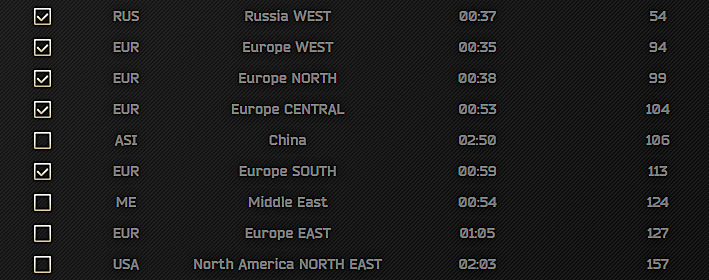
Server capacity constraints resolve through selecting less congested server regions or patiently waiting for slot availability. Conversely, player concentration issues require the opposite approach – migrating to higher-population servers, selecting popular maps, and choosing peak activity periods.
How to turn on DLDSR with DLSS in Escape from Tarkov guide, benefits and issues, will it make the image more sharp and is it worth it
In search of better performance and frames in Tarkov.
Mastering EFT Matchmaking: Your Complete Implementation Guide
Successfully navigating EFT’s matching system requires accurately diagnosing which constraint you’re facing and applying the appropriate countermeasures. Misidentifying the root cause leads to implementing ineffective solutions that waste valuable gaming time.
Advanced Strategy: Experienced players monitor matching patterns – if queue times consistently exceed 10+ minutes across multiple maps, you’re likely experiencing server capacity issues. If times vary significantly between maps, player concentration is probably the culprit.
Common mistakes include stubbornly queuing for popular maps during server capacity constraints, failing to adjust server selections based on time zones, and not utilizing the Weapons Unlock progression system to inform your map choices based on current player objectives.
For optimal results, combine multiple approaches: select 2-3 medium-popularity maps, configure multiple server regions spanning different time zones, and deploy during regional peak hours rather than global dead periods.
Pro players recommend maintaining a Complete Guide mentality – understanding that matching optimization is an ongoing process requiring regular adjustment as player populations shift throughout the wipe cycle.
Remember that your Class Guide knowledge can indirectly improve matching by informing you which locations other players are likely targeting based on their current progression needs and available equipment.
Action Checklist
- Diagnose your constraint: test multiple maps – if all have long queues, it’s server capacity; if times vary significantly, it’s player concentration
- For Scav runs: select Customs or Shoreline, avoid Reserve/Interchange during peak hours
- Adjust server selection: add 2-3 additional regions in the launcher
- Time optimization: deploy during regional evening hours (7-11 PM local time)
- Monitor and adapt: if queues persist >10 minutes, switch to alternative maps or server regions
No reproduction without permission:Game Guides » How to fix long matching times in Escape from Tarkov on PMC and Scavs. EFT 1.0 release fix for long raid search time Master EFT matchmaking with proven strategies to reduce PMC and Scav queue times in 1.0