
TL;DR
- Press X to open menu, select Pokémon, access summary page, then press Minus (-) to rename
- NPC-traded Pokémon cannot be renamed, while player-traded Pokémon get one rename chance
- All personally caught Pokémon can be renamed unlimited times with creative freedom
- Use strategic naming for team organization and quick identification during battles
- Check summary page for rename availability indicator before attempting name changes
Unlike Ash Ketchum’s famous unnamed Pikachu, you can give your Pokémon memorable identities in Pokémon Legends: Z-A. The game revolutionizes nickname management compared to traditional Pokémon titles by eliminating the need for specialized NPCs like the Name Rater.
Renaming mechanics in Legends: Z-A provide unprecedented flexibility, allowing instant name changes anywhere and anytime during your adventure. This means if your starter Pokémon deserves a better name after bonding or you spot a typo in your initial naming attempt, corrections happen instantly without backtracking to specific locations.

To initiate the renaming process in Pokémon Legends: Z-A, begin by pressing the X button to access your main menu interface. Navigate through your Pokémon roster and highlight the specific creature you wish to rename, then select the option to view their detailed summary page.
Once the summary screen loads, locate and press the Minus (-) button on your controller to activate the name editing interface. This action instantly opens a text input field where you can type your desired nickname, with the game automatically saving changes upon confirmation.
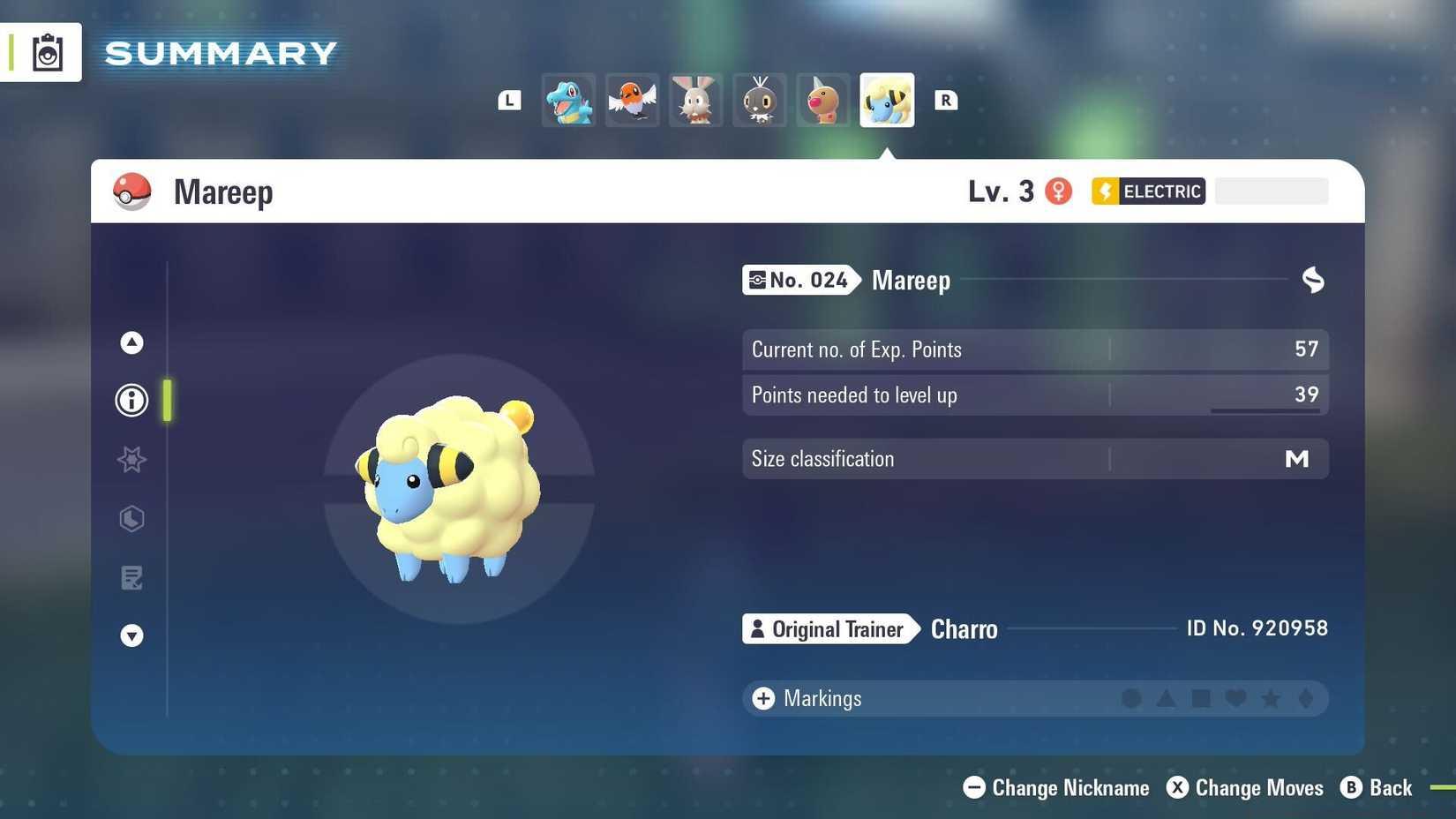
Image: Game Freak/The Pokémon Company, Nintendo via Polygon
Pro Tip: For optimal naming efficiency, prepare your desired names beforehand to minimize menu navigation time. Consider creating thematic naming conventions for your team members to maintain consistency across your Pokémon collection.
Not every Pokémon in your collection qualifies for name changes. NPC-traded Pokémon received from in-game characters permanently lock their original names, with the renaming option completely absent from their summary pages. This restriction preserves the narrative context of Pokémon received through story-related exchanges.
Player-traded Pokémon from other human trainers offer a single renaming opportunity after transfer. This one-time change allows you to personalize traded Pokémon while respecting the original trainer’s initial naming decision. After this single modification, the name becomes permanently locked.
All Pokémon captured personally through wild encounters, including Eevee, Pikachu, and other species, enjoy unlimited renaming freedom. You can establish naming themes, correct errors, or completely rebrand your team members as your strategy evolves throughout the game.
Beyond basic identification, strategic naming can significantly enhance your gameplay experience. Consider implementing type-coding systems by incorporating elemental symbols or abbreviations into names (e.g., “AquaFang” for Water-type moves). This provides instant type recognition during intense battles where quick decisions matter.
Common naming pitfalls to avoid include excessively long names that become truncated in battle interfaces, confusing special characters that hinder readability, and offensive terms that might violate community guidelines. Optimal names balance creativity with practical visibility across all game screens.
For team organization, establish consistent naming conventions that indicate role specialization—such as “TankChamp” for defensive Pokémon or “Speedster” for fast attackers. This systematic approach helps quickly identify the right Pokémon for specific battle situations without memorizing individual stats.
Looking to expand your Pokémon Legends: Z-A expertise? Our Complete Guide covers advanced gameplay mechanics, while the Weapons Unlock guide explains combat optimization. For team building strategies, consult our comprehensive Class Guide for role-specific recommendations.
Action Checklist
- Press X to open menu and select target Pokémon
- Access Pokémon summary page and press Minus (-) button
- Verify rename availability (check for grayed-out option)
- Implement type-coding naming system for battle efficiency
- Establish team role naming conventions for organization
No reproduction without permission:Game Guides » How to rename your Pokémon in Legends: Z-A Master Pokémon renaming in Legends: Z-A with expert tips, restrictions, and naming strategies